

Are you facing common challenges when working with model-driven app forms? In this article, we’ll delve into troubleshooting techniques to help you overcome these issues and optimize your experience with these forms.
Deactivating the Command Bar
Sometimes, you may want to disable the command bar on your form pages. With the “DisableFormCommandbar” feature, you can do just that without affecting its functionality in list (grid), dashboard, or other supported contexts. Here’s how you can use it:
https://myorg.crm.dynamics.crm/main.aspx?appid=9cc32144-f5dd-eb22-8235-00224814a3af&pagetype=entityrecord&id=0d9189b6-f334-ee11-bdf4-6045bd3d71df&flags=DisableFormCommandbar=true
Suspending Form Handlers
To temporarily suspend all form handlers, such as OnLoad, OnSave, business rules, OnChange, and TabStateChange, activate the “DisableFormHandlers=true” flag. It’s a powerful tool for debugging and fine-tuning your form’s behavior:
https://myorg.crm.dynamics.crm/main.aspx?appid=9cc32144-f5dd-eb22-8235-00224814a3af&pagetype=entityrecord&id=0d9189b6-f334-ee11-bdf4-6045bd3d71df&flags=DisableFormHandlers=trueIf you need to target a specific event handler, you can use &flags=DisableFormHandlers=eventName or even specify an index like this:
https://myorg.crm.dynamics.crm/main.aspx?appid=9cc32144-f5dd-eb22-8235-00224814a3af&pagetype=entityrecord&id=0d9189b6-f334-ee11-bdf4-6045bd3d71df&flags=DisableFormHandlers=onLoad

https://myorg.crm.dynamics.crm/main.aspx?appid=9cc32144-f5dd-eb22-8235-00224814a3af&pagetype=entityrecord&id=0d9189b6-f334-ee11-bdf4-6045bd3d71df&flags=DisableFormHandlers=onLoad_1
Fine-Tuning Form Libraries
With “DisableFormLibraries,” you can take control of form libraries. Here are your options:
- Disable all form libraries: Set the flag to “true” to disable all form libraries.
- Disable a specific form library by index: Use “index” to target a particular form library based on its index.
- Disable form libraries within a range: Specify ‘startIndex’ and ‘endIndex’ to deactivate form libraries within that range.
Precise Control over Form Controls
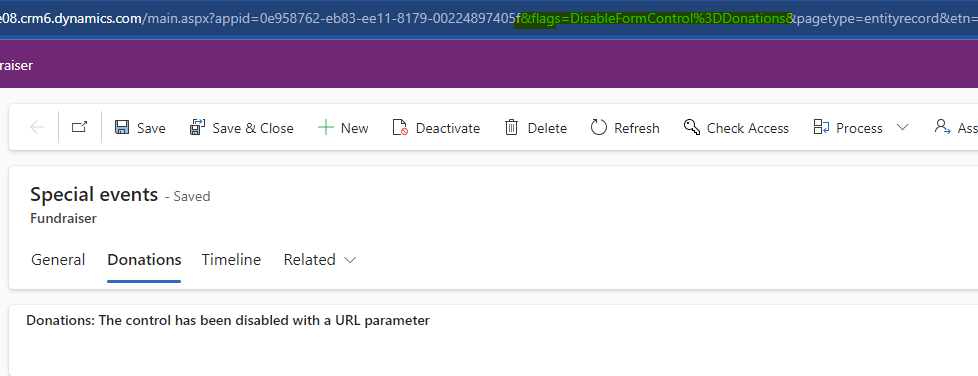
When you encounter issues with web resource controls on your form, use “DisableFormControl” by specifying the control’s name to deactivate it. This is especially handy if you suspect a specific control is causing problems after using “&flags=DisableWebResourceControls=true“
Putting Business Process Flows on Hold
To pause all business process flows on your form, activate the “DisableBusinessProcessFlows=true” flag. This action temporarily suspends the functionality of all business process flows associated with your form.
 My Trial