

Reviving deleted flows in Power Automate, whether they are non-solution or solution flows, is achievable within 21 days of their deletion. For those unfamiliar, a non-solution flow is one not created within a solution framework. If you’re an admin, you can easily accomplish this with the help of the Power Automate management connector. This process involves two key actions: ‘List Flows as Admin‘ and ‘Restore Deleted Flows as Admin.’
It’s important to note that flows deleted over 21 days ago are irrecoverable. Even Microsoft Support cannot assist in their recovery. Additionally, be aware that once a flow is restored, it will be in a disabled state by default. You’ll need to manually activate the flow as needed.
Here’s a straightforward, four-step guide to restoring your deleted flows:
Step 1: List Your Deleted Flows
First, identify the deleted flows in your environment:
- Create a manual flow with a button trigger.
- Use the ‘List Flows as Admin‘ action to enumerate deleted flows in a specific environment. Make sure to select ‘Yes‘ in the ‘Include Soft-Deleted Flows‘ option.
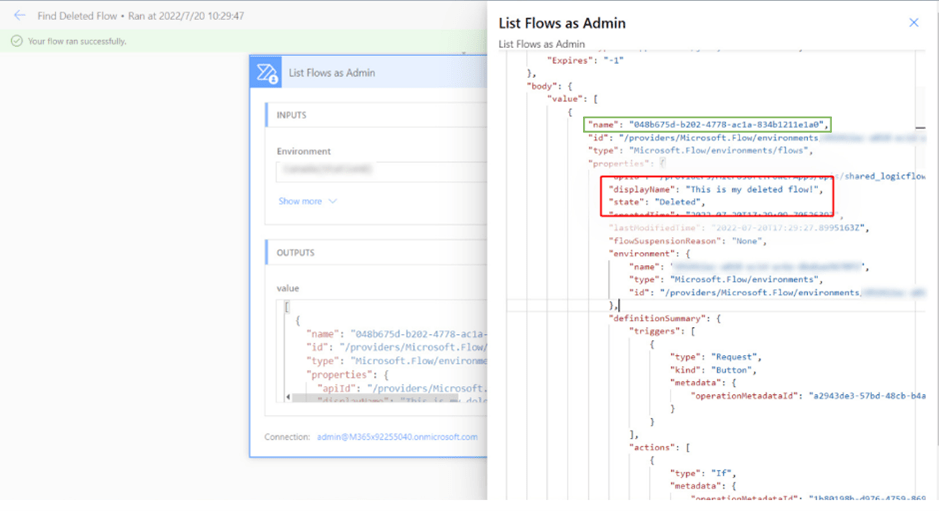
- Run this flow to obtain the flowName, which is crucial for the next step. This step will display all accessible flows, including those that are soft-deleted, in your admin capacity.

Step 2: Identify the Desired Flow
Carefully review the output from the first step:
- Look for the ‘displayName‘ and other metadata to locate the flow you wish to recover.
- Note down the flow’s ‘name‘ for use in the subsequent step.
Step 3: Prepare to Restore the Flow
Set up the restoration process:
- Add the ‘Restore Deleted Flows as Admin‘ action from the Power Automate Management Connector.
- In the Flow field, input the ‘name‘ value you identified earlier.

Step 4: Execute the Restoration
Finally, run the flow to restore the deleted item:
- After successfully running the flow, you’ll find the restored flow in a disabled state in its original environment.
This process is not only efficient but also ensures that you can quickly recover important flows that may have been inadvertently deleted, keeping your workflows seamless and uninterrupted.
 My Trial