

Power Automate is an incredibly powerful tool for automating workflows, but to truly harness its full potential, you need to be familiar with some key expressions and functionalities that can make your life as a developer easier. Below are some commonly useful Power Automate expressions and techniques that you can incorporate into your workflows.
1. Create a Unique Array
When dealing with arrays, you may encounter scenarios where you need to eliminate duplicates. Here’s how you can create a unique array from any array using Power Automate expressions.
union(array1, array1)Explanation: The union function takes two arrays as inputs and returns an array that contains the unique elements from both arrays. By passing the same array twice, you effectively filter out duplicates.
2. Filter an Array
Sometimes you need to filter an array based on a specific condition. Here’s a quick way to achieve that.
filter(array, condition)Example: If you want to filter an array to only include items where a specific field equals a certain value:
filter(yourArray, item()?[‘status’] == ‘approved’)Explanation: The filter function processes each item in the array and includes it in the output array only if the condition is met.
3. Sort an Array
Sorting an array in ascending or descending order can be easily done using the sort function.
sort(yourArray, 'asc')Explanation: The sort function organizes the array in ascending ('asc') or descending ('desc') order based on the specified criteria.
4. Get First or Last Item in an Array
Need to grab the first or last item in an array? Use these expressions.
first(array)
last(array)
Explanation: The first function returns the first item in the array, while last returns the last item.
5. Join Array Elements
If you need to concatenate all elements in an array into a single string, use the join function.
join(array, separator)Example:
join(yourArray, ', ')Explanation: This will combine all elements of yourArray into a single string, separated by commas.
6. Check If an Array Contains a Value
Want to check if a particular value exists in an array? Use the contains function.
contains(array, value)Explanation: This function returns true if the specified value is found within the array, and false otherwise.
7. Remove Empty Elements from an Array
To clean up an array by removing all empty elements, you can use the filter function.
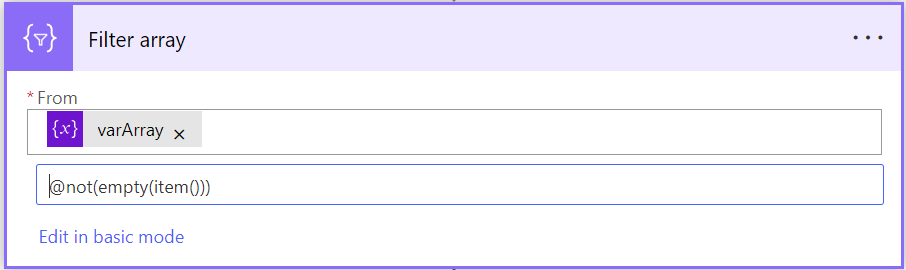
Explanation: This filters out any empty elements from the array, leaving you with a clean list of non-empty items.
8. Get Substring from a String
Extracting a portion of a string based on position and length is made easy with substring.
substring(string, startIndex, length)Example:
substring('PowerAutomate', 5, 9) Explanation: This would return 'Automate'.
9. Convert a String to Lowercase/Uppercase
Use toLower or toUpper to change the case of your strings.
toLower(string)
toUpper(string)
Explanation: These functions convert all characters in a string to lowercase or uppercase, respectively.
10. Format Dates
Date formatting is essential in many workflows. Use formatDateTime to specify the format you need.
formatDateTime(triggerOutputs()?['headers']['x-ms-file-last-modified'], 'yyyy-MM-dd')Explanation: This function takes a date/time value and converts it into the desired format, like 2024-05-15.
 My Trial