

With the advent of Generative AI in Copilot Studio, building smarter, more interactive copilots has never been easier. This new mode allows your copilots to go beyond predefined topics, tapping into the capabilities of AI to generate relevant questions, actions, and responses dynamically. Today, we’ll explore how you can harness Generative AI to make your copilots more intelligent and adaptive to user needs.
How Does Generative Mode Work?
In traditional copilot setups, responses are mapped based on predefined topics and trigger phrases. However, in Generative Mode, the copilot takes it a step further. It can dynamically generate responses by selecting multiple actions or topics based on the conversation context, allowing it to handle multi-intent queries in real-time.
For example, imagine a user asks, “What are the store hours and what’s the weather like?”. Instead of processing the question separately, Generative AI chains together the Store Hours and Weather actions, responding to both intents seamlessly in a single interaction.
Enabling Generative Mode
To unlock this feature for your copilot:
- Open Copilot Studio and navigate to Settings.
- Select the Generative AI tab and switch the mode from Classic to Generative.
- Set your content moderation strictness (optional).
- Hit Save, and your copilot is ready to use AI-powered responses!
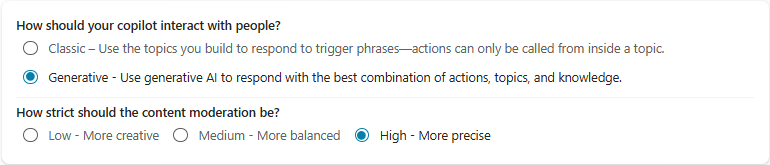
This feature gives you flexibility, whether you’re looking for a more interactive, conversational AI or you need to handle more complex queries with multiple intents.
Using the Conversation Map
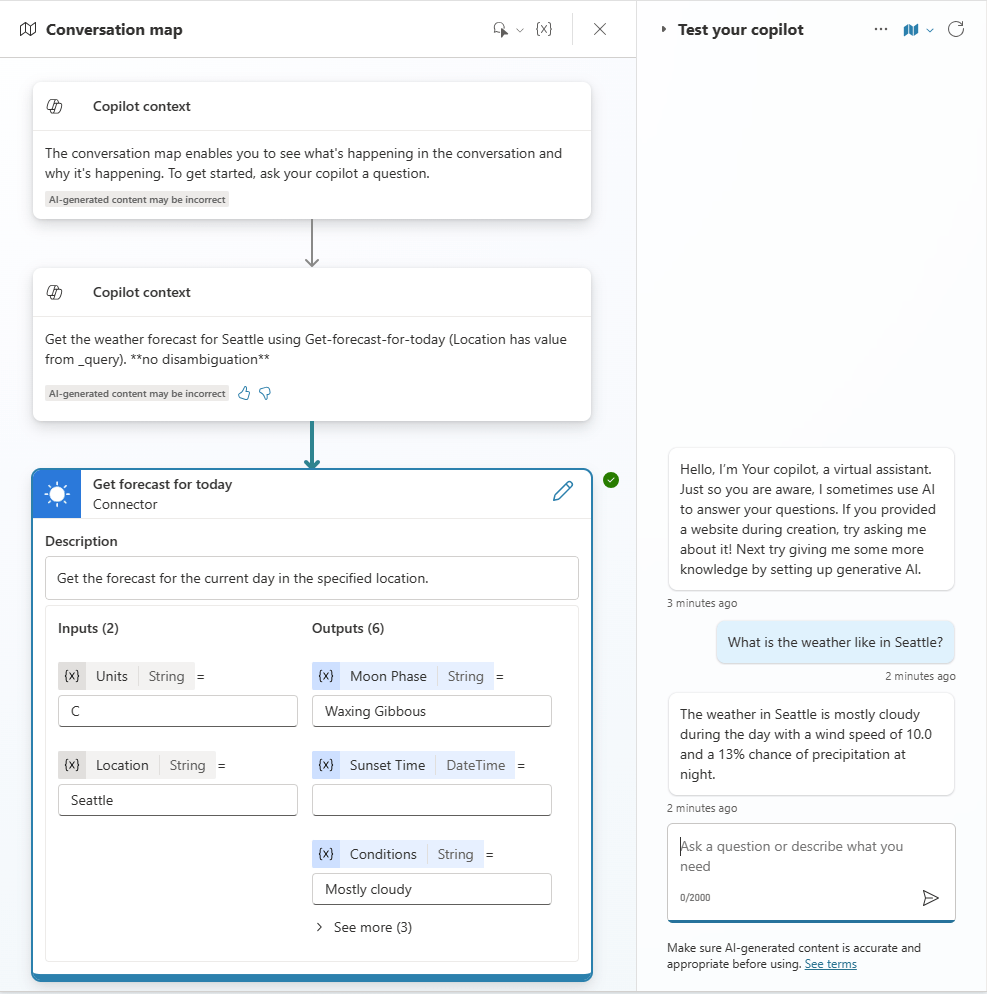
The conversation map is a powerful tool for testing and refining your copilot’s responses. This visual interface shows the plan your copilot generates to respond to queries, including how it selects actions, fills in conversation details, and handles multiple intents.
For instance, if a user asks about weather conditions, the map will show the weather plugin in action, illustrating how inputs like location are filled from conversation history. The conversation map ensures you’re always in control of how responses are structured.
Best Practices for Topic and Action Descriptions
While Generative AI simplifies conversation flows, providing clear and precise descriptions for each topic or action is critical for accuracy:
- Use simple, clear language. Avoid jargon and technical terms.
- Be specific. Ensure your topics or actions aren’t too vague. For instance, differentiate between “Current Weather” and “Tomorrow’s Forecast.”
- Keep descriptions short. One or two concise sentences explaining the topic or action will help AI understand and respond appropriately.
Real-Life Examples of Generative AI in Action
Example 1: A user asks, “What’s the weather in Seattle?” The copilot intelligently recognizes “Seattle” and pulls up the current weather for that location.
Example 2: A user asks for store hours and their nearest store location in one query. The copilot combines the Store Hours and Store Locator topics, giving a comprehensive response.

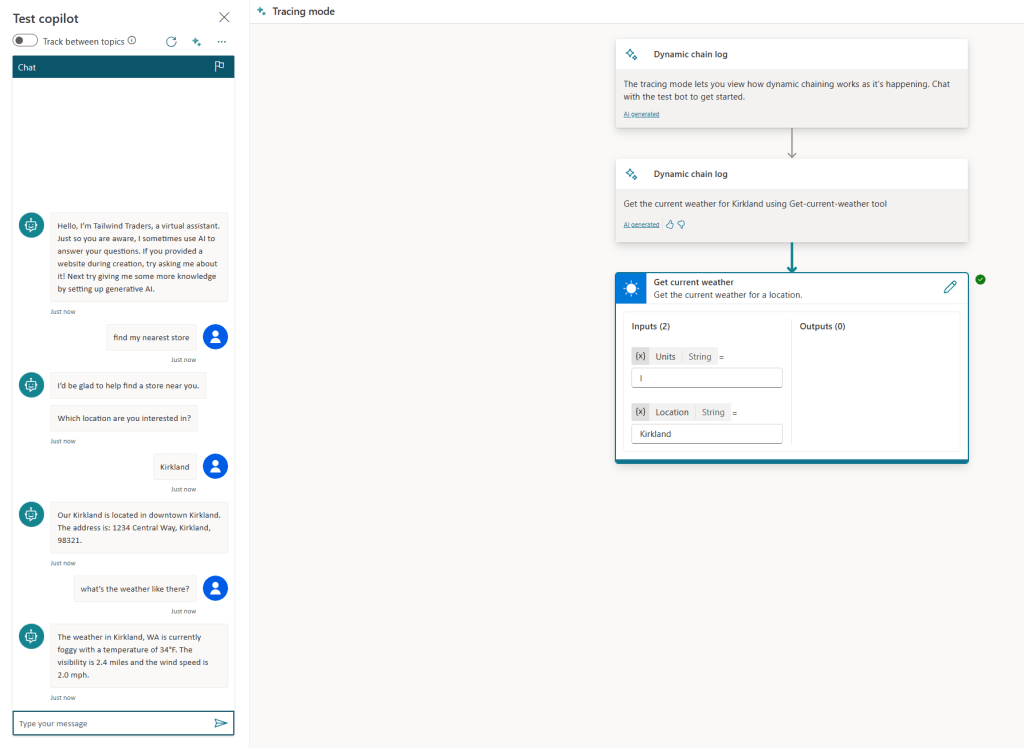
Example 3: The user previously asked for the nearest store and was shown “Kirkland”. When they later ask, “What’s the weather there?”, the copilot retrieves Kirkland’s weather based on the earlier context.
With Generative AI in Copilot Studio, your copilots can handle more dynamic, multi-intent conversations, making user interactions smoother and more intuitive. By leveraging this feature, you’ll empower your copilots to respond in a human-like, fluid manner while minimizing manual topic creation. Enable Generative AI today and take your copilots to the next level!
 My Trial