

Let’s be honest, most of us working in Dynamics 365 or the Power Platform have, at some point, wondered: Why can I see contacts, accounts, and leads so easily in Dataverse, but not the logs, clicks, or telemetry?
To answer that, we need to go back to something that quietly powers everything behind the scenes: The Common Data Model or CDM for short.
What is the Common Data Model, really?
Think of CDM like a blueprint for how your business data should be organized. Imagine you’re moving houses and need to label all your boxes clearly: “Kitchen Plates”, “Living Room Books”, “Garage Tools”. CDM gives your business data that same clarity and consistency.
Instead of each app inventing its own way to define a contact or an account, Microsoft created a shared model a universal schema so that everything from Dynamics 365 Sales to Customer Insights to Power Apps can talk about the same data in the same way.
So when you open the Contact table in Dataverse, it’s not just some random CRM table. It follows a clearly defined structure laid out in the CDM. This makes it portable, predictable, and easy to plug into other apps and services.
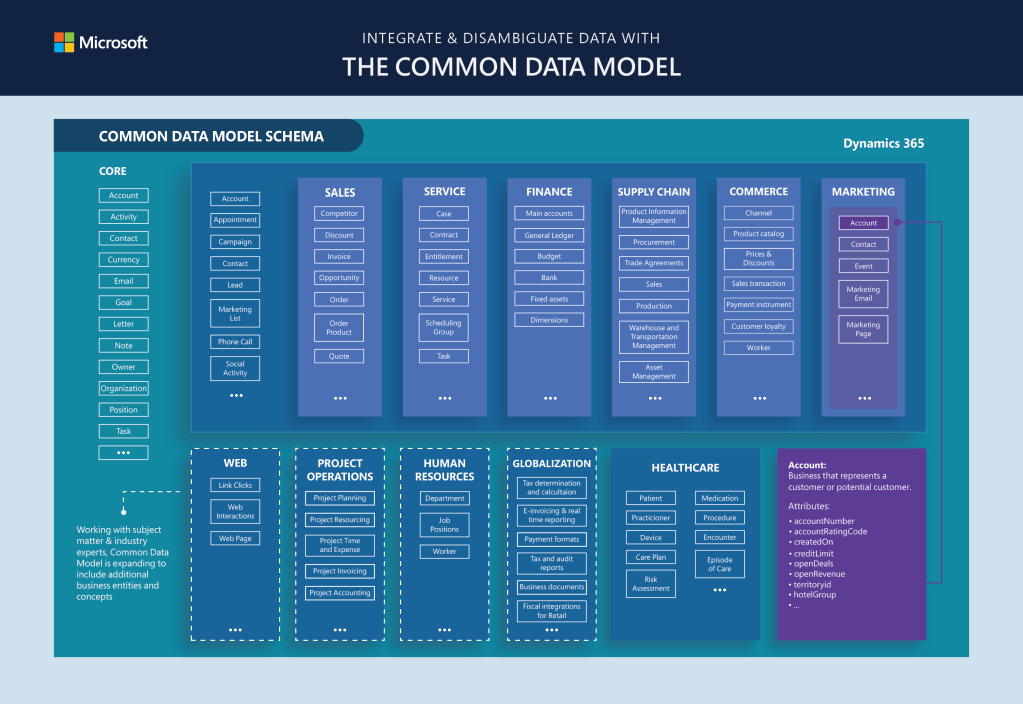
Why some tables are front and center in Dataverse… and some are hidden away
Let’s go back to the house analogy.
- The main rooms of the house your kitchen, bathroom, and bedroom are like core business tables: Contact, Account, Lead. They’re right there in the open, easy to walk into (or access).
- Meanwhile, the attic or utility room is where you might store logs, telemetry, or diagnostic tools. Important? Yes. Frequently accessed by the family? Probably not. These types of data serve a different purpose: analytics, performance tracking, or compliance auditing.
Dataverse is designed for operational data the kind that powers real-time apps and business processes. Contact records, opportunity pipelines, appointment scheduling—this is where Dataverse shines.
Telemetry or log data, on the other hand, can grow massive in volume and isn’t typically used in day-to-day business workflows. That’s why these are often stored in different systems like Application Insights, Azure Data Lake, or Microsoft Fabric, depending on how you’ve configured your environment.
So where does CDM come into play?
CDM acts as a translator. Whether the data lives in Dataverse or in a data lake, CDM ensures it follows the same language.
- When data is stored in Dataverse, it naturally conforms to CDM’s structure. The table names, column types, relationships these all match what’s defined in the CDM.
- When data is exported to Azure Data Lake, you’ll often see it in CDM folder format. These include
model.jsonandmanifest.cdm.jsonfiles that describe the data layout so external tools (like Power BI or Azure Synapse) can understand and work with it easily.
The beauty of CDM is that it bridges how the data is defined with where the data is stored.
Why this matters (real-life example)
Let’s say you’re running a customer journey in Dynamics 365 Marketing. You send out an email, and a contact opens it and clicks the link.
- The Contact record lives in Dataverse and follows the CDM structure. You can look it up instantly in a model-driven app or Power Apps canvas app.
- The email click event, however, might be logged in an interaction table that’s optimized for bulk telemetry. This often gets exported to a data lake or Fabric, and it’s not something you’d query from Dataverse directly.
This separation keeps your day-to-day app experience fast and responsive, while still capturing rich analytics in the background.
What are the benefits of CDM in all of this?
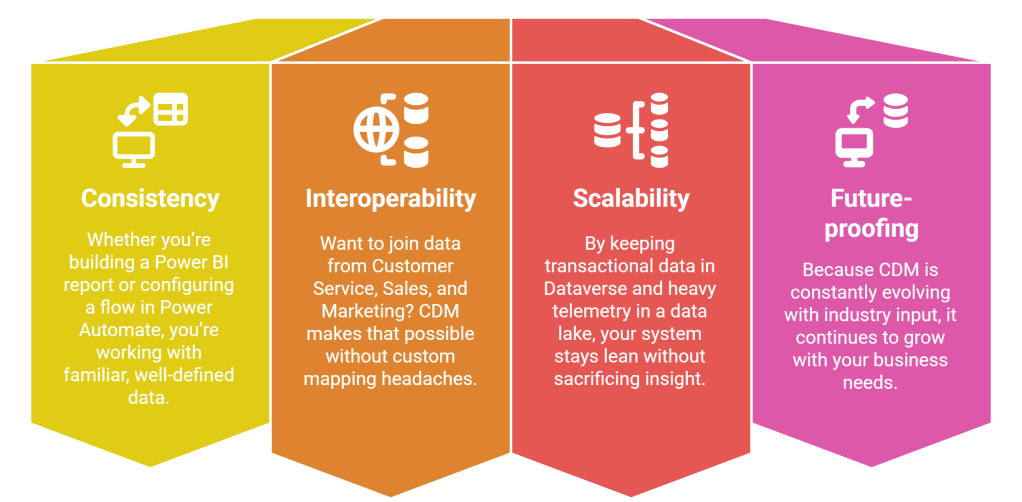
CDM may not have a front-end UI or a fancy dashboard, but it plays a massive role in making your CRM, marketing, and data analytics stack actually work together. It’s the reason why your app knows who your customers are. And it’s also why those mountains of click data don’t clog up your core tables. So the next time you open a Contact record in Dataverse, give a little nod to CDM it’s doing a lot more behind the scenes than you think.
 My Trial