

Forms may load fast, and your JavaScript may run smooth but if your Dataverse schema is bloated, inconsistent, or inefficient, performance will eventually take a hit.
Welcome to Part 6 of our Power Platform Performance series. This time, we’re focusing on the often-overlooked foundation of any model-driven app: your schema.
This post introduces the Object Checker, a tool that helps surface issues at the table (entity), column, and relationship level, things that don’t always show up in form testing but directly impact performance, reliability, and maintainability.
🧩 What is Object Checker?
Object Checker is a real-time diagnostic tool in Power Apps that validates Dataverse components like:

It runs automatically as you configure components in the Power Apps maker portal, surfacing design flaws or unsupported patterns with actionable recommendations.
Unlike Power Apps Checker, which scans packaged solutions, Object Checker gives immediate feedback during the build phase.
🛠️ Why Schema Health Matters for Performance
Even with performant forms and optimized JavaScript, an unhealthy schema can cause:
- Longer query execution times
- Inefficient fetches due to excessive columns or misused data types
- Poor experience when loading subgrids or views
- Increased storage and sync overhead
- Errors when migrating or importing solutions
In short: your schema is your app’s spine. If it’s not right, nothing else will be.
🔎 What Kinds of Issues Does Object Checker Find?
Object Checker flags issues such as:
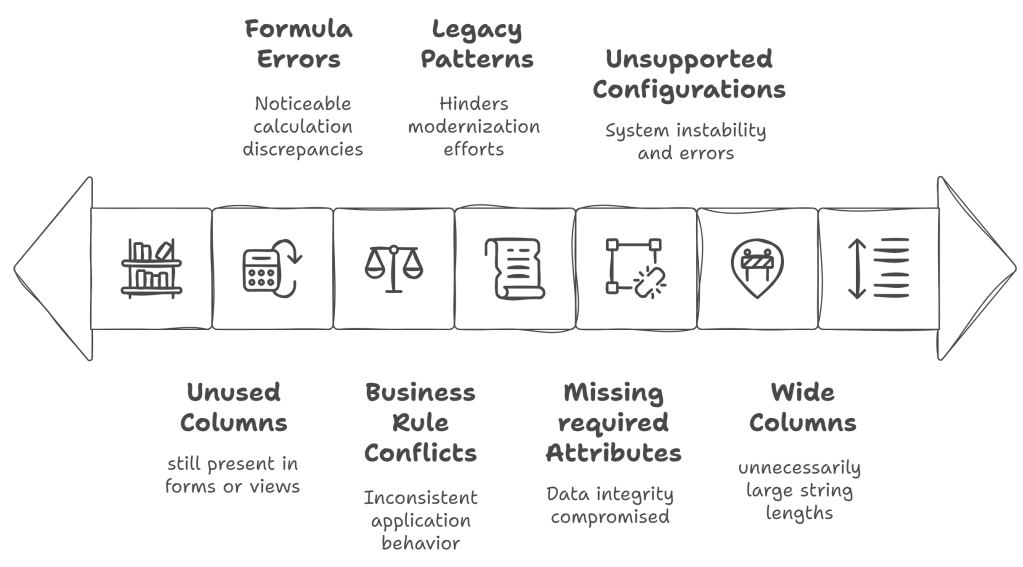
These aren’t just warnings they can lead to runtime errors, sync failures, or slowness when retrieving related data.
⚡ When and Where It Runs
Object Checker runs:
- In real-time, while you’re editing components in the table designer
- Within specific tabs: Columns, Relationships, Business Rules, Views, etc.
- In both modern and classic designers (limited parity in classic)
You’ll see red or yellow indicators next to components that need review. Each message includes a severity level and a recommendation.
✅ Fixing Schema with Confidence
As you respond to Object Checker feedback:
- 🔄 Shorten column lengths where appropriate
- 🧹 Delete or hide unused fields
- 🔄 Review relationships that are N:N when they should be 1:N
- 🚦 Resolve formula and rule issues early before they affect users
- 📦 Test schema changes in a development environment to avoid cascading impact
Remember: even seemingly “harmless” warnings can degrade long-term performance if ignored.
🧰 Object Checker vs. Power Apps Checker
| Feature | Object Checker | Power Apps Checker |
|---|---|---|
| Scope | Real-time, schema-level | Batch scan, full solution |
| Where it runs | Maker portal UI | Maker portal, CLI, CI/CD |
| Focus | Tables, columns, forms, views | JavaScript, plug-ins, fetchXML, etc. |
| Ideal for | Fixing design-time component issues | Validating solution quality before deploy |
Use both together to create end-to-end design quality and performance validation.
🧠 Final Takeaways
Your app’s performance isn’t just defined by what users see it’s also deeply influenced by how you shape your schema.
✅ Use Object Checker during design to eliminate structural flaws
✅ Shorten field lengths and remove unused components
✅ Fix business rules and relationship warnings proactively
✅ Combine with Power Apps Checker to catch both schema and logic-level issues
A clean schema isn’t just good practice it’s your long-term performance insurance policy.
 My Trial