

Introduction: The Problem with the Default Timeline
The Timeline control in model-driven apps is one of the most useful UI components for displaying activities, notes, and related records. But until recently, the scope was somewhat rigid you could only surface system-defined entities such as emails, appointments, and custom activities.
What if you wanted to bring in non-activity data, such as attendance logs, payments, or external system records?
That’s where the Custom Timeline Connector comes in a game changer that lets you extend the timeline beyond its out-of-the-box capabilities.
What Is a Custom Timeline Connector?
A Custom Timeline Connector (a.k.a. Secondary Record Source) is a JavaScript-based extension that feeds data into the timeline.
Instead of relying solely on standard activity feeds, this connector acts as a secondary data provider, dynamically pulling related records from any table (custom or standard) and rendering them seamlessly within the Timeline UI.
Microsoft’s official sample on GitHub SecondaryRecordSource provides a foundation for this capability.
This sample allows developers to define:
- A JavaScript class implementing the record source
- Methods to fetch, format, and render data
- Custom icons, commands, and visuals for each record
My Use Case: Showing Attendance in Contact Timeline
In my scenario, I wanted to visualize a Contact’s attendance history directly in their Timeline view each attendance record representing participation in an event, game, or session.
Instead of creating a new activity or complex subgrid, I used the Custom Timeline Connector to show attendance logs as if they were native activities.
Here’s a snippet from my connector implementation (devlab_TimelineHello.js):
const entity = "crd34_attendance";
const filterOData = `_${"crd34_player"}_value eq ${this.parentId}`;
const select = [
    "crd34_attendanceid",
    "crd34_attendancename",
    "crd34_present",
    "createdon"
].join(",");

const query = `?$select=${select}&$filter=${filterOData}&$orderby=createdon desc`;
const resp = await this.context.webAPI.retrieveMultipleRecords(entity, query);
This query dynamically pulls all attendance records related to the Contact, formats them into a Timeline-ready data shape, and surfaces them in the UI.
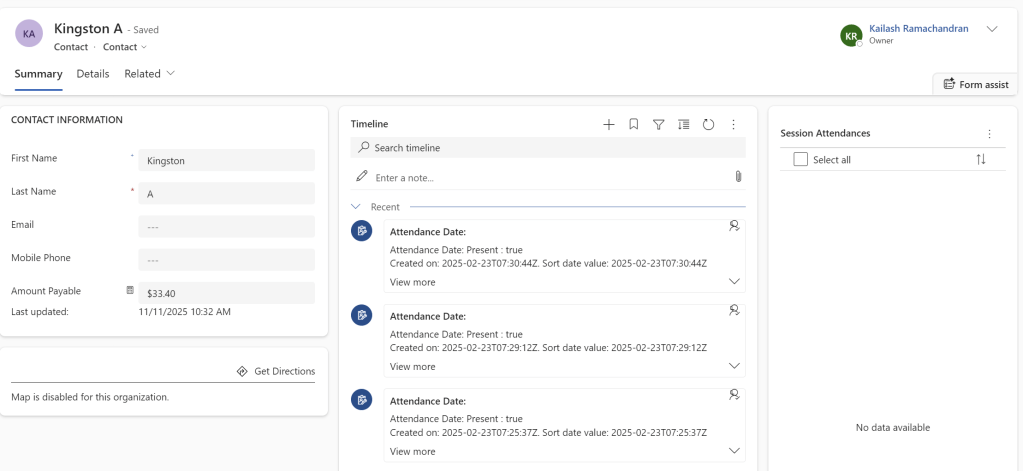
⚙️ How It Works
The connector class HelloRecordSource includes three main components:
- init(context)
Initializes the connector and captures the current record (Contact) context. - getRecordsData(request, filter)
Fetches related records using Web API.
In my case, it retrieves allcrd34_attendancerows linked to the Contact ID. - buildRecordUX(recordData)
Defines how each record is rendered in the timeline header, body, footer, and custom icons.
By leveraging these methods, you can design the timeline to display any type of related data, formatted however you want.
Why This Is a Game Changer
The ability to plug in your own data source for the timeline opens up new possibilities for model-driven apps:
✅ View non-activity records (e.g., Attendance, Invoices, Service Logs) directly in the timeline
✅ Apply custom filtering and search beyond what’s possible in subgrids
✅ Enhance user experience with custom visuals, icons, and hyperlinks
✅ Unify related data into a single chronological view no navigation needed
For teams managing events, training sessions, or check-ins, this approach makes Dynamics feel more contextual and less click-heavy.
Credits & Resources
A huge shoutout to Marius Wodtke his blogs on the Timeline component are some of the most comprehensive resources available.
They helped me understand not just how to set up the connector but also how to design engaging UX within the timeline itself.
If you’re exploring advanced timeline customization, start with these references:
Final Thoughts
If you have ever wished your timeline could show more than just emails and notes, this connector is your answer. It bridges the gap between data relevance and user context something every Dynamics app could benefit from.
 My Trial