

In Part 1 and Part 2, we explored foundational Azure integration with Dataverse and different ways to interact with Dataverse data within Azure. Now in Part 3, we dive into the event streaming side of integration specifically using Azure Event Hubs to stream Dataverse data in near real-time.
This is ideal for scenarios where you need to:
- Ingest CRM/Power Apps data into real-time analytics pipelines
- Detect patterns or anomalies as data arrives
- Power live dashboards or feed data lakes incrementally
What Is Azure Event Hub?
Azure Event Hub is a high-throughput, real-time data ingestion platform. Think of it like a message stream where producers send events, and consumers read those events for processing.
It is designed for:
- Massive-scale ingestion (millions of events/sec)
- Decoupled producers and consumers
- Real-time or batch consumers (Stream Analytics, Databricks, Azure Functions, etc.)
In our case, Dataverse is the producer, and Azure is the consumer.
Why Use Event Hubs With Dataverse?
You might be tempted to use Service Bus or polling APIs. So why Event Hubs?
| Feature | Service Bus | Event Hub |
|---|---|---|
| Ordered delivery | ✅ Yes | ✅ Yes |
| Batch consumption | ❌ Not ideal | ✅ Excellent |
| Real-time streaming | ❌ Basic | ✅ Optimized |
| Retention window | ❌ Short | ✅ Up to 7 days |
| Scale | ❌ Limited | ✅ Massive |
This makes Event Hub the go-to solution for real-time pipelines, telemetry, and ML inference based on live business events.
How Does It Work With Dataverse?
Here’s how to connect the dots between Dataverse and Azure Event Hub:
- Dataverse Plugin (Azure-aware)
- A custom plugin is registered on create/update/delete operations
- Plugin sends data to an Azure Service Endpoint
- Service Endpoint (configured for Event Hub)
- Use the Plugin Registration Tool to register a Service Endpoint of type Event Hub
- Bind it to the plugin step (e.g.,
Create of Contact)
- Azure Event Hub Namespace
- This is where the events land. Think of it like a topic.
- You can configure partitions, throughput units, and retention policy
- Consumers (Azure Function / Stream Analytics / Databricks)
- Downstream services read the Event Hub stream
- Perform enrichment, transformation, analytics, or AI
Real-World Use Case: Fraud Detection on Transaction Events
Scenario: You run a lending business. When a new loan application is submitted in Dynamics 365, you want to instantly:
- Stream it to an ML model for fraud scoring
- Enrich it with external credit data
- Save results to a central data lake and Dataverse
Solution:
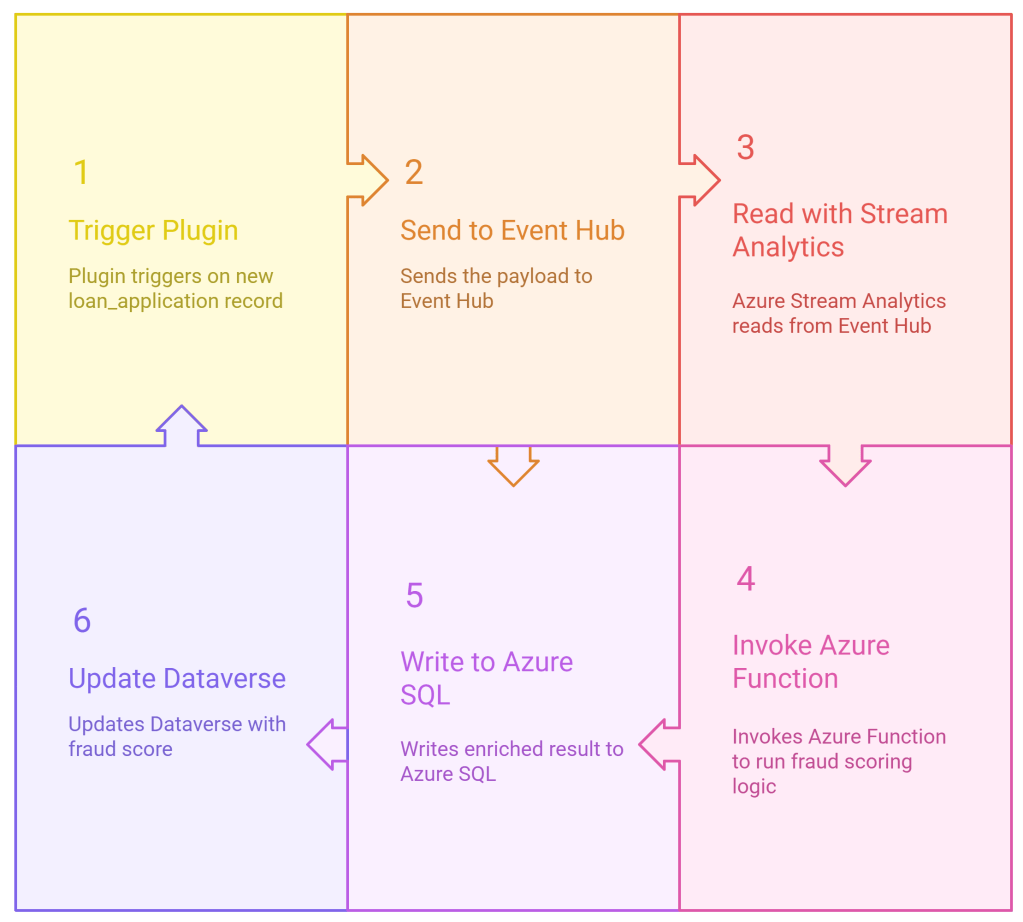
This keeps Dynamics lean while enabling AI and real-time workflows.
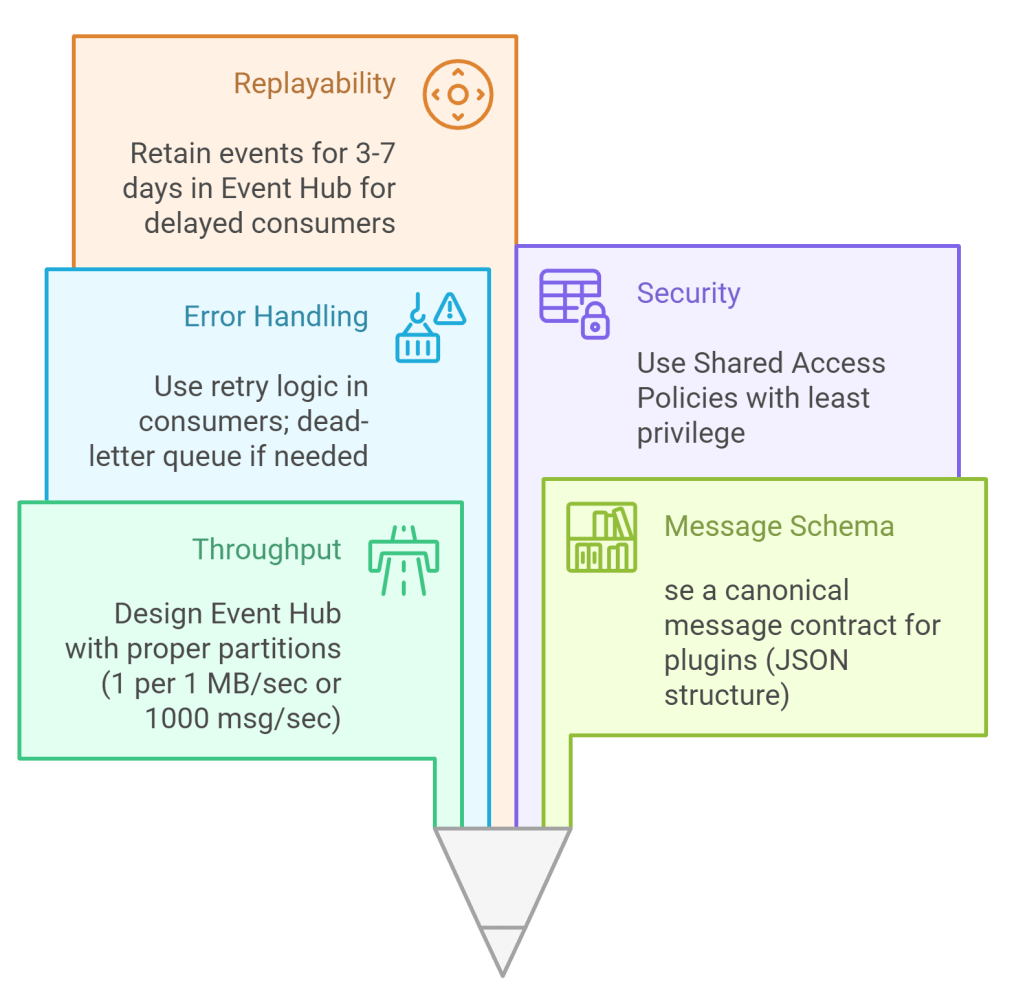
Design Considerations
Analytics Possibilities
Once data is streaming into Event Hub, you can:
- Visualize it in Power BI (via Azure Stream Analytics output)
- Store it in Azure Data Lake for batch analytics
- Process in Azure Databricks for ML
- Trigger alerts using Azure Monitor or Sentinel
You’re no longer restricted to just CRUD logic in Dataverse. You’re in the world of streaming data architecture.
 My Trial