

If you’ve worked with Microsoft Dataverse long enough, you’ve probably asked yourself at least once:
“What’s the correct way to connect to Dataverse for this scenario?”
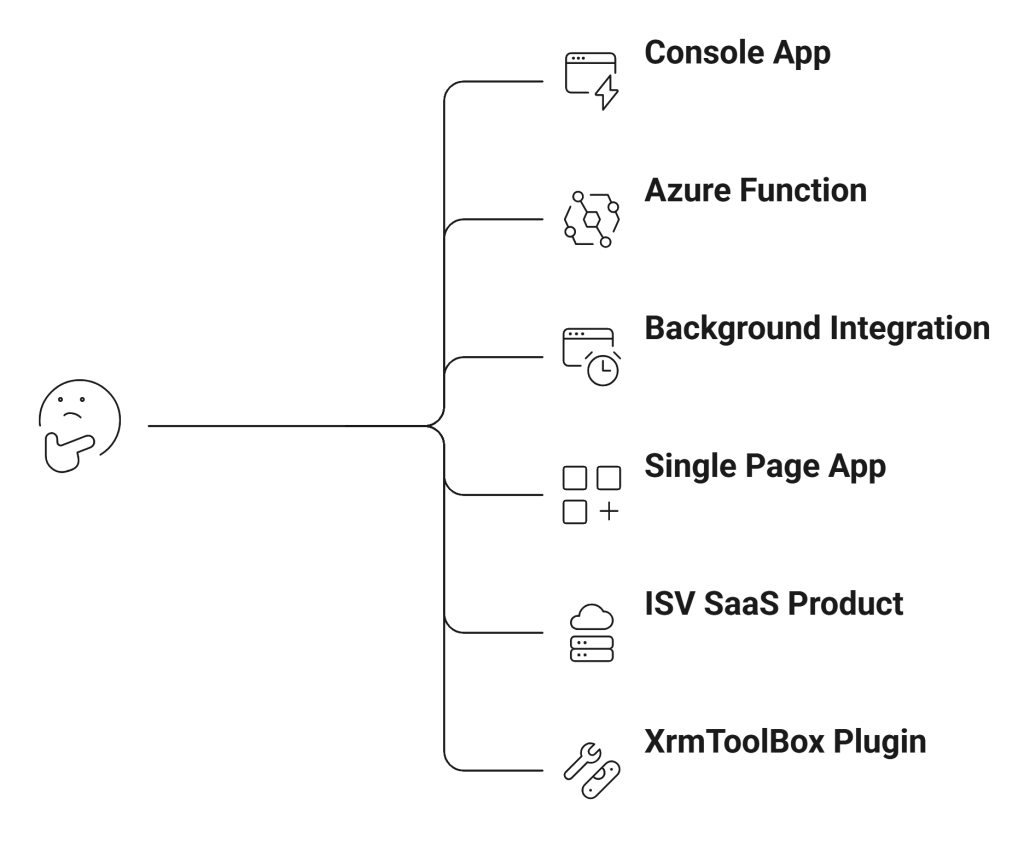
Microsoft documentation covers each scenario individually. But rarely do we see them explained side-by-side with architectural clarity. This series fixes that.
In this first part, we’ll answer one question: Which Dataverse connection method should you use and why?
The Big Picture: Two Core Dimensions
Every Dataverse connection strategy boils down to two decisions:
- Who is authenticating?
- A human user?
- An application (no user involved)?
- Where is the code running?
- Desktop?
- Backend service?
- Browser?
- Multi-tenant SaaS?
Once you answer those, the correct pattern becomes obvious.
The 5 Modern Ways to Connect to Dataverse
Here’s the simplified landscape.
| Scenario | Recommended Approach |
|---|---|
| Developer tool / Console app | OAuth (delegated user) + ServiceClient |
| Backend service / Azure Function | Server-to-Server (S2S) app authentication |
| Enterprise internal integration | Single-tenant S2S |
| ISV / AppSource SaaS | Multi-tenant S2S |
| Browser-only app (SPA) | MSAL + Web API (CORS enabled) |
Let’s unpack each.
1. Delegated User Authentication (Interactive Login)
This is the most common pattern for:
- Console apps
- Dev utilities
- Admin tools
- XrmToolBox plugins
- Migration scripts
Here, the app authenticates as a real user.
How It Works
- You register an app in Microsoft Entra ID.
- The user signs in via OAuth.
- Dataverse issues an access token.
- The app executes operations using the user’s security roles.
Under the hood:
- The access token contains the user’s identity.
- Dataverse enforces security roles exactly as if the user was inside Model-driven Apps.
When to Use It
Use this when:
- You need user-level permissions.
- You want actions to appear in audit history under a specific user.
- You are building internal tools for admins or consultants.
This is what most developers should start with.
2. Server-to-Server (S2S) Authentication
Now let’s move to the more enterprise-grade pattern.
Server-to-Server means:
The application authenticates without a user.
There is no login prompt. No popup. No interaction.
Instead:
- The application identity itself is trusted.
- Dataverse sees it as an “Application User”.
This is the pattern you use for:
- Azure Functions
- Web APIs
- Background jobs
- Integration pipelines
- Scheduled services
- Data sync engines
How It Works
- Register an application in Entra ID.
- Grant application permissions.
- Create an Application User inside Dataverse.
- Assign security roles to that application user.
- Authenticate using Client Secret or Certificate.
Important concept:
Dataverse does not treat the app as a system superuser.
You must explicitly assign roles to the application user just like a normal user.
3. Single-Tenant vs Multi-Tenant S2S
This is where many architects get confused.
Single-Tenant S2S
- App only works inside your organization.
- One Azure AD tenant.
- Used for internal enterprise integrations.
Example:
- Your company builds a middleware service that syncs ERP and Dataverse.
Multi-Tenant S2S
- App serves multiple customer tenants.
- ISV or SaaS product.
- Each customer grants consent.
- Each environment needs an Application User configured.
Example:
- You publish a Dataverse automation product on AppSource.
- Customers install and grant permissions.
This pattern is significantly more complex and requires onboarding automation and tenant consent flows.
4. SPA (Single Page Application) + CORS
This is the modern browser-only pattern. No backend. No proxy server.
The browser:
- Uses MSAL to authenticate.
- Gets an OAuth access token.
- Calls Dataverse Web API directly.
- Dataverse allows it through CORS configuration.
This is ideal for:
- React apps
- Angular dashboards
- Internal portals
- Lightweight admin panels
Key constraints:
- Only delegated user permissions (not application permissions).
- The logged-in user must have security roles in Dataverse.
- Token acquisition must be handled carefully.
This approach eliminates the need for a custom backend just to relay API calls.
5. XRM Tooling & Legacy Patterns
Historically, we had:
- WS-Trust authentication
- Office365 auth type
- Older CrmServiceClient patterns
These are deprecated. If you still see:
AuthType=Office365
It’s time to migrate. Modern Dataverse authentication is OAuth-based always.
A Practical Decision Framework
Let’s make this concrete.
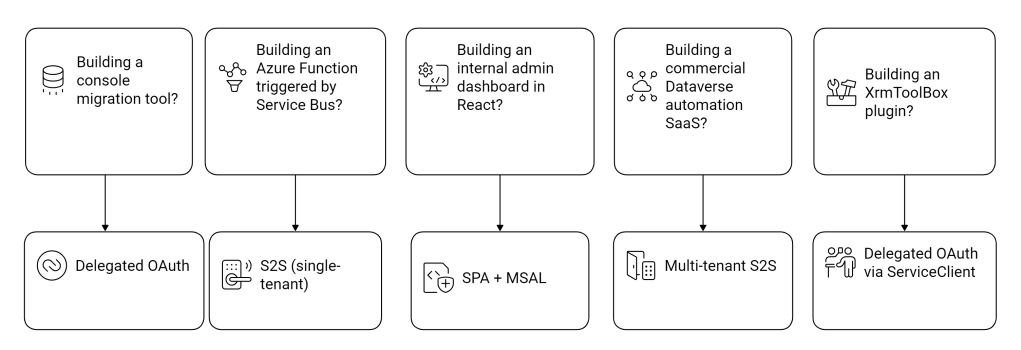
Security Model Deep Dive (What Actually Happens)
When you call Dataverse:
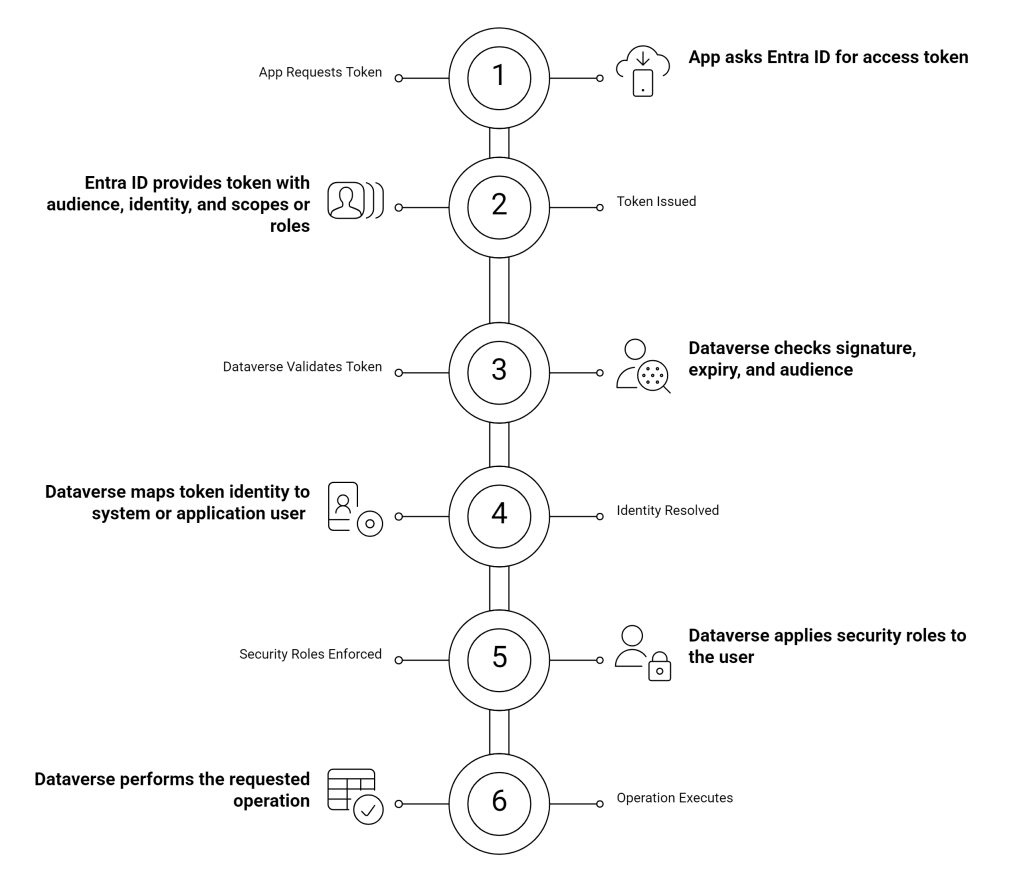
Understanding this flow is critical. Because every authentication method in this series simply changes how the token is acquired not how Dataverse enforces security.
The Most Common Mistakes I See
After years in Dynamics and Power Platform projects, here are the recurring anti-patterns:
- Using delegated login for background jobs.
- Giving System Administrator to application users “just to make it work”.
- Not creating an Application User after app registration.
- Confusing multi-tenant app registration with Dataverse environment configuration.
- Leaving old Office365 auth in legacy tools.
Authentication mistakes lead to:
- Security gaps
- Broken production integrations
- Conditional Access failures
- Token expiry runtime crashes
Choosing correctly upfront saves pain later.
 My Trial
One thought on “Connecting to Dataverse: Choosing the Right Authentication Strategy”