

In the previous post, we implemented Server-to-Server authentication for a single tenant.
That works perfectly when:
- You own the tenant.
- The app runs internally.
- It serves one organization.
But what if:
- You are building a commercial product?
- Multiple customers must connect their own Dataverse environments?
- You’re publishing to AppSource?
- Your app needs to scale across tenants?
Now you’re in Multi-Tenant Server-to-Server authentication territory. This is where architecture becomes serious.
What Is Multi-Tenant S2S?
Multi-tenant S2S means:
One application serves multiple Microsoft Entra tenants and multiple Dataverse environments.
Each customer:
- Has their own tenant.
- Has their own Dataverse environment.
- Must explicitly grant your application permission.
- Must create an Application User in their environment.
You do not control their tenant. They must trust you.
The Key Difference from Single-Tenant
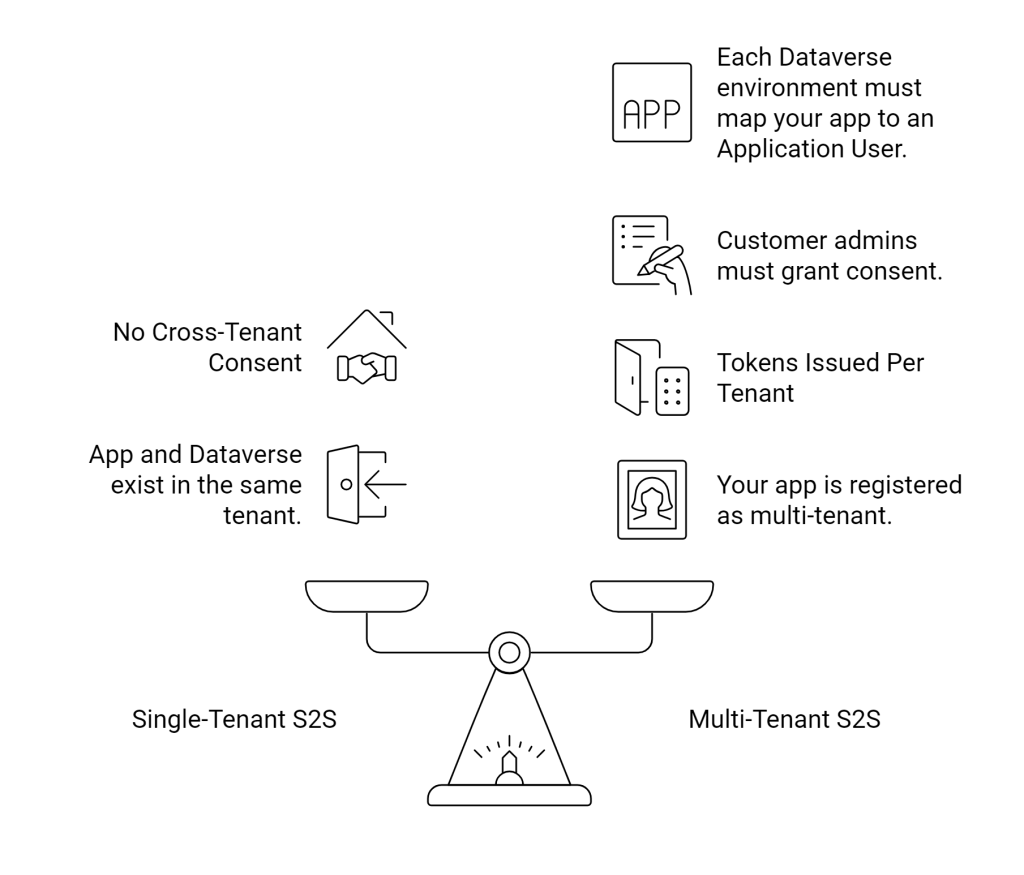
Architecture Overview
Let’s break down what happens.
Step 1 – Your SaaS App
You register your app in Entra ID as:
- Supported account types:
Accounts in any organizational directory (Multi-tenant)
Step 2 – Customer Admin Grants Consent
When a customer signs up:
- They authenticate.
- They grant your app application permissions.
- Entra creates a Service Principal in their tenant.
Step 3 – Application User in Dataverse
Inside each customer’s Dataverse environment:
- They create an Application User.
- They select your App Registration.
- They assign security roles.
This links:
Customer Dataverse → Your SaaS Application.
The Authentication Flow
When your backend service runs:
- It determines which customer environment to call.
- It requests an access token using:
- Client ID
- Client Secret (or certificate)
- Customer Tenant ID
- Entra validates.
- Entra issues a token for that tenant.
- Dataverse validates token.
- Dataverse maps to Application User.
- Roles enforced.
- Operation executes.
The same code. Different tenant authority.
The Critical Design Pattern: Tenant Isolation
Your SaaS backend must:
- Store tenant ID
- Store Dataverse URL
- Store environment metadata
- Never mix tokens
- Never cache tokens across tenants
Example storage table:
| CustomerId | TenantId | DataverseUrl |
|---|
You cannot hardcode tenant authority. Each call must resolve tenant context dynamically.
Example Code: Multi-Tenant Token Flow
using Microsoft.PowerPlatform.Dataverse.Client;

public ServiceClient CreateServiceClient(string tenantId, string orgUrl)
{
    string connectionString =
        $"AuthType=ClientSecret;" +
        $"Url={orgUrl};" +
        $"ClientId=YOUR-MULTI-TENANT-APP-ID;" +
        $"ClientSecret=YOUR-SECRET;" +
        $"Authority=https://login.microsoftonline.com/{tenantId};";

    return new ServiceClient(connectionString);
}
Key difference:
We dynamically inject the tenant ID into the Authority. That’s the multi-tenant switch.
Security Architecture Considerations
Multi-tenant SaaS requires serious thought.
1. Secret Management
Never embed secrets in code.
Use:
- Azure Key Vault
- Managed Identity
- Secret rotation strategy
2. Least Privilege
Do not instruct customers to give:
- System Administrator
Instead:
- Define required permissions clearly.
- Provide minimal security role template.
3. Tenant Isolation
Never reuse:
- ServiceClient instances
- Tokens
- Cached identities
Across tenants.
One tenant = one isolated context.
Comparison Snapshot
| Pattern | User Context | Multi-Tenant | Best For |
|---|---|---|---|
| Delegated OAuth | Yes | Yes | Tools / UI apps |
| Single-Tenant S2S | No | No | Internal integrations |
| Multi-Tenant S2S | No | Yes | SaaS / ISV |
 My Trial