

Understanding How Transactions Work in Dataverse
When building custom solutions in Microsoft Dataverse, one of the most overlooked yet critical aspects is how transactions and locking work.
Just like a checkout counter at a grocery store, once a transaction starts, the system locks resources (records, tables, indexes) to ensure consistency. If another customer (process) tries to access those resources before the first one is done, they will have to wait, causing delays or even failures.
This blog will introduce how transactions and locking work in Dataverse, the challenges they introduce, and how to design scalable solutions that minimize issues.
🔍 What is a Database Transaction?
A transaction is a sequence of operations executed as a single unit of work. It either completes successfully (commit) or rolls back if something goes wrong, ensuring data consistency.
Real-World Example: Bank Transfers
Imagine you are transferring money between two bank accounts:
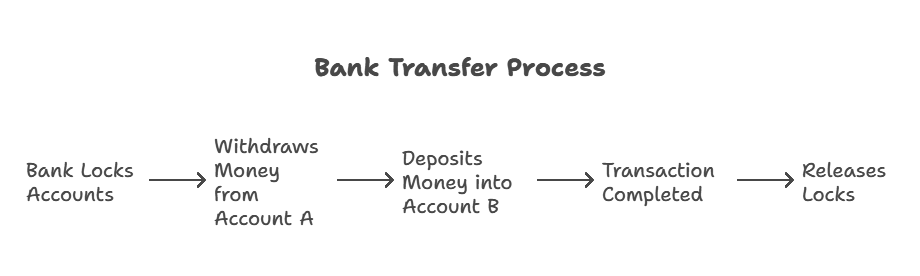
Now, what happens if the system crashes at step 4? The transaction rolls back, preventing Account A from losing money without Account B receiving it.
This ensures data consistency which is exactly how Dataverse transactions work.
🔐 How Transactions and Locking Work in Dataverse
Every Dataverse data operation (internal or custom) interacts with the same database resources (records, memory, indexes). To maintain data integrity: ✅ When a record is created, a write lock is applied.
✅ When a record is updated, a write lock is applied.
✅ Locks extend to any related indexes and tables to ensure data consistency.
✅ Locks are only released when the transaction commits or aborts.
❗ Common Mistake: Locking Too Many Records
A badly designed plug-in might try to fetch and update hundreds of records inside a single transaction.
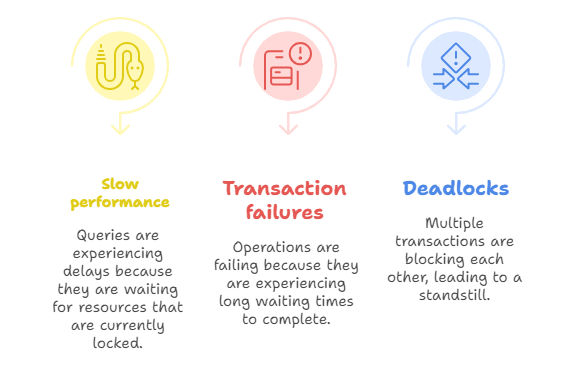
This extends the duration of locks, slowing the system down and causing deadlocks.
⚡ The Impact of Locking on Performance
When multiple transactions try to access the same records at the same time, it can lead to:
📌 Example Scenario: An Update Conflict
Let’s say you have a plug-in that updates an Account record every time a new Case is created.
❌ Bad Practice: Locking a Record for Too Long
public void Execute(IServiceProvider serviceProvider)
{
    IPluginExecutionContext context = (IPluginExecutionContext)serviceProvider.GetService(typeof(IPluginExecutionContext));
    IOrganizationService service = ((IOrganizationServiceFactory)serviceProvider.GetService(typeof(IOrganizationServiceFactory))).CreateOrganizationService(context.UserId);

    // Fetch an account record
    Entity account = service.Retrieve("account", new Guid("11111111-aaaa-bbbb-cccc-222222222222"), new ColumnSet(true));

    // Update the account
    account["name"] = "Updated Name";
    service.Update(account);

    // Simulating long processing time
    System.Threading.Thread.Sleep(5000); // 5-second delay
}
💡 Problem:
- The Account record is locked for 5 seconds.
- Other requests trying to update the same Account must wait.
- If multiple processes stack up, the system slows down and may even fail.
✅ Best Practices to Avoid Locking Issues
To prevent performance bottlenecks:
- Keep transactions short – Complete operations quickly to release locks.
- Avoid unnecessary record updates – Update only fields that have changed.
- Use asynchronous processing for heavy operations – Offload non-critical tasks.
✅ Good Practice: Using Asynchronous Processing
public void Execute(IServiceProvider serviceProvider)
{
    IPluginExecutionContext context = (IPluginExecutionContext)serviceProvider.GetService(typeof(IPluginExecutionContext));
    IOrganizationService service = ((IOrganizationServiceFactory)serviceProvider.GetService(typeof(IOrganizationServiceFactory))).CreateOrganizationService(context.UserId);

    // Update the record quickly
    Entity account = new Entity("account");
    account.Id = new Guid("11111111-aaaa-bbbb-cccc-222222222222");
    account["name"] = "Updated Name";
    service.Update(account);

    // Move long operations to an external system
    SendToExternalSystemAsync(account);
}

private async Task SendToExternalSystemAsync(Entity account)
{
    using (HttpClient client = new HttpClient())
    {
        var content = new StringContent(JsonConvert.SerializeObject(account), Encoding.UTF8, "application/json");
        await client.PostAsync("https://api.example.com/external-system", content);
    }
}
🚀 Benefits of this approach: ✅ The plug-in executes quickly, releasing locks immediately.
✅ External processing is handled asynchronously, without blocking Dataverse.
✅ No performance impact on concurrent transactions.
🎯 Key Takeaways
✅ Transactions in Dataverse ensure data consistency.
✅ Locking is necessary but can cause performance issues if not handled correctly.
✅ Long transactions slow down the system and can cause failures.
✅ Best practice: Keep transactions short and offload heavy tasks asynchronously.
📢 Coming Up Next…
In the next blog, we’ll dive deeper into Blocking in Dataverse: Why It Happens and How to Prevent It. Stay tuned! 🚀
 My Trial
A lock isn’t taken on the read, so in your plugin example, you should switch the account update with the sleep statement.
LikeLike
You are absolutely right, Dataverse doesn’t acquire a lock on reads, so placing the Thread.Sleep after the account update would better simulate a long-running operation that holds a write lock on the record.
Thanks for catching that! I will update the example to reflect this more accurately, it’s crucial when illustrating transaction and locking behavior, especially when demonstrating potential race conditions or deadlocks in plugin execution.
Appreciate the sharp eye 👏
LikeLike