


Power Automate gives every action a default name the moment you drop it onto the canvas. “Apply to each”, “Condition”, “Send an email (V2)”. Then you move on, wire up the logic, and ship the flow.
Six months later, someone maybe you, maybe a colleague opens it for the first time. They see twelve nested scopes, each one called “Scope”. They see four HTTP actions called “HTTP”, “HTTP 2”, “HTTP 3”, “HTTP 4”. They have no idea what any of them do without clicking into every single one.
This is the most common and most easily avoidable pain point in Power Automate development. And yet it persists on almost every team because nobody wrote the rules down.
Microsoft’s Power Automate Coding Guidelines address this directly. The guidance is practical, quick to implement, and makes a measurable difference to how maintainable your flows are over time. Let’s break it down.
Why naming matters more in flows than in code
In traditional code, your IDE gives you go-to-definition, find-all-references, rename-symbol. You can navigate to context quickly. Power Automate’s canvas is purely visual you read flows top to bottom, opening and closing nested actions to understand what’s happening. The name of each action is the documentation. If the name is wrong or generic, there’s no fallback.
Bad names also break the feedback loop between makers. When a junior maker hands a flow to an architect for review, a flow full of “Compose”, “Compose 2”, “Compose 3” forces the reviewer to open every action before they can even orient themselves. That slows reviews, increases missed issues, and means feedback is less specific.
The six naming principles from the official guidelines
1. Descriptive and meaningful names
Every action name should answer the question: what does this step do? Not what type of action it is what it does in this specific context.
Instead of Trigger1, use New Email Received. Instead of Send an email (V2), use Send Invoice Approval Request to Finance.
The test: if someone read only the action names in your flow without opening any of them could they write a one-paragraph summary of what the flow does? If yes, your names are working. If no, they need work.
2. CamelCase or underscores
sendinvoiceapproval is a single opaque token. sendInvoiceApproval or send_invoice_approval is three readable words. The difference matters at a glance when you’re scanning a collapsed scope with twenty actions inside it.
Pick one convention camelCase or underscores and apply it uniformly. Mixing styles in the same flow creates cognitive overhead for no benefit.
3. Prefixes or tags for component type
This is where teams can layer in real structure. Microsoft suggests conventions like Trg_ for triggers, Act_ for actions, and Var_ for variables.
There’s room to extend this for your organisation’s context. Some teams use Scp_ for scope containers, Cnd_ for conditions, or Lp_ for loops. The specific prefix matters less than the consistency of applying it.
For professional Power Platform architects, this also pays dividends when building with child flows or solution-layered architectures prefixes make it immediately obvious what you’re looking at when a parent flow calls into a child.
4. Consistent application across flows
A naming convention that’s applied by one maker on one flow is a personal habit. A naming convention applied across all flows on all makers in your tenant is an organisational standard.
This distinction matters for maintenance at scale. When you adopt a convention uniformly, any maker can pick up any flow and orient themselves in seconds rather than minutes. That’s a concrete reduction in onboarding time and a concrete reduction in maintenance risk.
5. Document your conventions
Write it down. Microsoft specifically recommends a SharePoint-based Power Platform hub where your maker community can access your style guide.
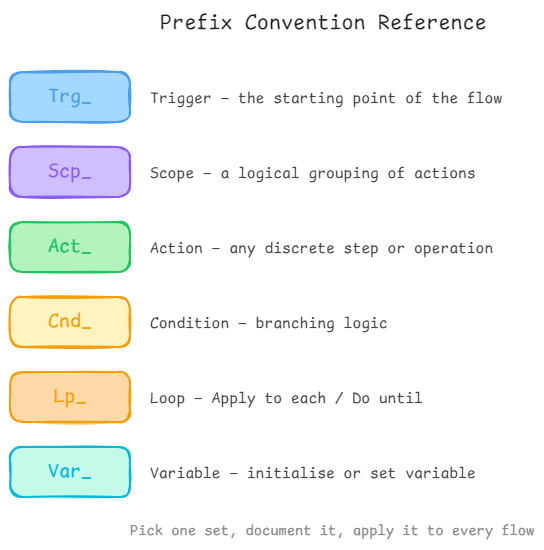
Documentation doesn’t need to be exhaustive. A single page listing your agreed prefixes, your casing convention, and three or four examples of good vs. bad names is enough to align a team. The absence of documentation is why every individual develops their own approach, and why every flow looks different.
6. Comment your actions
Power Automate lets you add a note to each action. Use it. This is the direct equivalent of inline code comments explain why the action is doing what it’s doing, not just what it’s doing. The name tells you what; the comment tells you why.
This matters most for complex flows and for actions whose logic is non-obvious: a filter expression, a specific error-handling pattern, a calculation that depends on business context that isn’t apparent from the inputs alone.
What good naming looks like in practice
Here’s the same flow fragment, poorly named and well named.
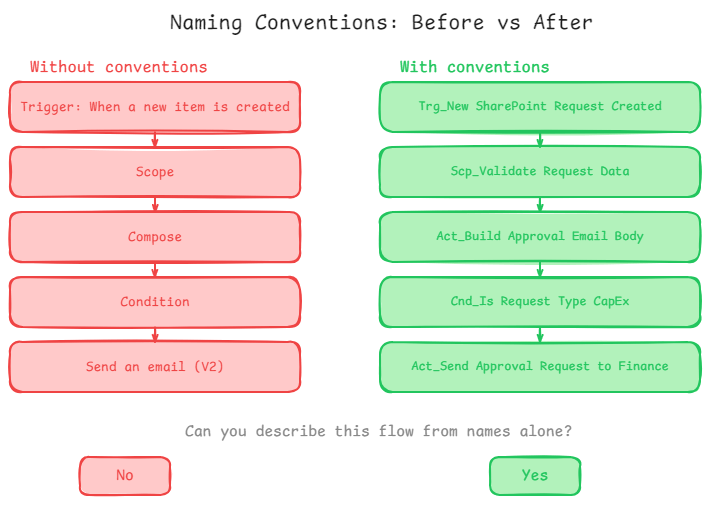
The second version is scannable. You can read the action list and understand the flow’s logic without opening a single action.
The organisational investment
The biggest blocker to consistent naming isn’t knowledge most makers know they should name things better. The blocker is time pressure and the absence of shared standards.
The fix is to make naming conventions a first-class deliverable. Put them in your Power Platform Centre of Excellence documentation. Include them in onboarding for new makers. Add a naming review to your flow review checklist.
For architects: this is also where solution-level governance pays off. If your organisation’s flows live in managed solutions, naming convention enforcement becomes part of the solution review gate. You can refuse to accept solutions into production that don’t meet the naming standard, which creates a structural incentive for makers to get it right.
The Microsoft documentation recommends a SharePoint site as the hub for these guidelines. That’s a reasonable starting point but the goal is to make the standard visible, accessible, and reinforced through process, not just available as a document that nobody reads.

