


Here’s a scenario that plays out on almost every Power Platform project.
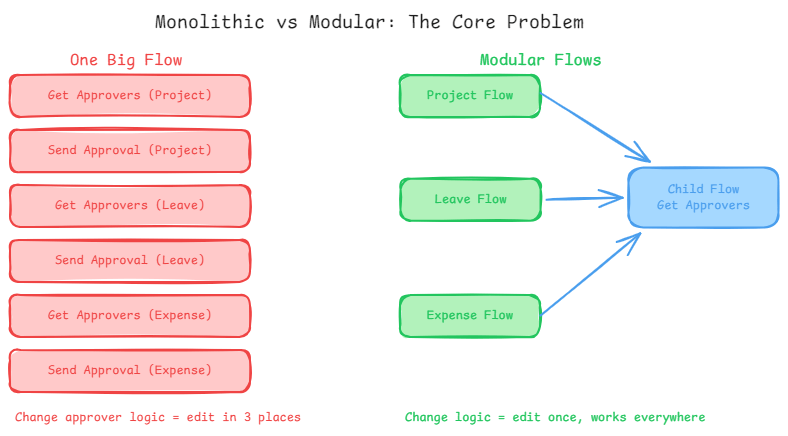
You have three approval workflows: one for project proposals, one for leave requests, one for expense submissions. Each one needs to look up the list of approvers from a SharePoint group. So you build that lookup logic into the first flow, then copy it into the second, then copy it again into the third.
Everything works. You ship it.
Six months later, the SharePoint group structure changes. Now you need to update the approver lookup logic. You remember it’s in the project flow. You update it. You push to production. Two days later, someone notices the leave request flow is broken because it still has the old logic. You missed it.
This is the problem child flows are designed to eliminate.
What a child flow actually is
A child flow is a standard Power Automate flow that accepts inputs, executes logic, and returns outputs just like a function in traditional code. It lives in a solution. Parent flows invoke it via the “Run a Child Flow” action, pass in whatever inputs it needs, and receive whatever outputs it returns.
The distinction matters: a child flow isn’t a sub-flow that only one parent uses. It’s a reusable component that any parent flow in the same solution can call. That’s what gives it its architectural value.
Microsoft’s coding guidelines frame this as the primary mechanism for creating reusable code in Power Automate. If a piece of logic appears in more than one place, it should be a child flow.
The Contoso approval example, unpacked
The example Microsoft uses in the official guidelines is worth dwelling on. Contoso has three approval processes. All three need to know who the approvers are, but the approvers differ by scenario each one is drawn from a different SharePoint group.
The naive implementation builds approver-lookup logic into each parent flow. The modular implementation builds a single child flow that accepts a SharePoint group name as an input, queries that group, and returns the approver list. Each parent flow calls it with a different group name.
The child flow doesn’t need to know what kind of approval it’s supporting. The parent flow doesn’t need to know how the approver list is assembled. Each component is responsible for exactly one thing.
When the SharePoint query logic needs to change pagination, filtering, error handling you edit the child flow once. Every parent flow that calls it gets the updated behaviour automatically, with zero additional changes.
The five benefits, applied
Microsoft’s guidelines identify five distinct benefits of using child flows. They are all real, but some matter more depending on where you sit in the organisation.
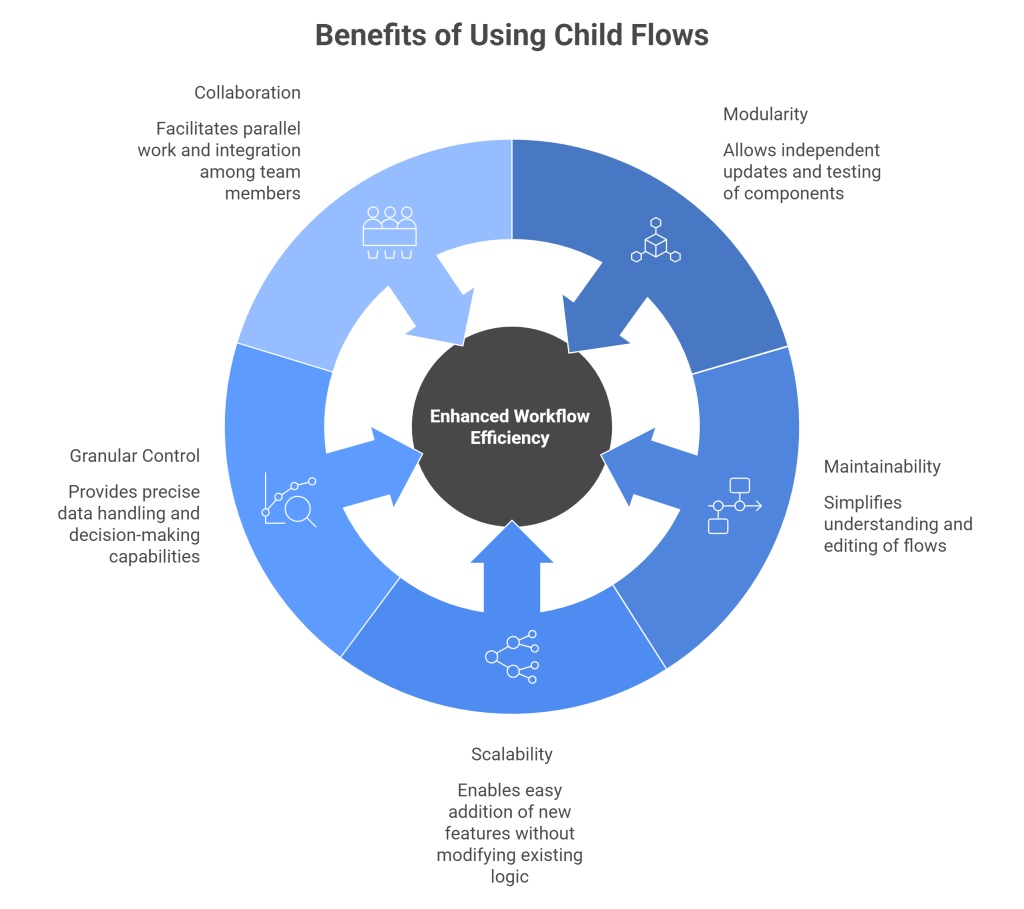
Modularity is the headline benefit. You can update, test, and deploy components independently. If your child flow has a bug, you fix the child flow you don’t have to touch the parent flows at all.
Maintainability is what makes modular flows practical at scale. A 200-action monolithic flow is genuinely difficult to understand and dangerous to edit. A 20-action parent flow that delegates to focused child flows is readable in minutes.
Scalability means adding a fourth approval type say, contractor agreements requires creating a new parent flow and calling the existing child flow. You don’t touch any of the existing logic. The new flow inherits all the improvements that have accumulated in the child.
Granular control is the feature that makes child flows powerful rather than just tidy. You pass data in, you get data out. This means child flows can make decisions and return results that drive dynamic behaviour in the parent. A child flow could return not just a list of approvers, but a structured object with approver emails, approval thresholds, and escalation contacts.
Collaboration becomes meaningful on multi-maker teams. One person builds the approval submission logic in the parent flows while another builds and tests the approver-lookup child flow. They work in parallel, agree on the input/output contract upfront, and integrate at the end.
The one thing most architects skip
Microsoft’s guidelines include a tip that’s easy to overlook: create the parent flow and all child flows directly in the same solution.
This isn’t just housekeeping. When you move solutions between environments development to test to production flows that live outside the solution don’t travel with it. If your parent flow calls a child flow that’s in a different solution or in the default environment, you will hit a dependency error the first time you try to move it.
Keeping everything in the same solution makes the relationship explicit and ensures the whole assembly is portable. It also makes it clear to anyone reviewing the solution what the component structure looks like.
If you’re building on top of an existing environment where some flows already live outside solutions, migrating them in before you start building dependencies is worth the upfront effort.
When to reach for this pattern
The signal is duplication. If you find yourself copying an action sequence from one flow to another or if you’re building a third flow that needs logic that already exists in two others that’s when a child flow pays off.
A single flow that doesn’t share logic with anything else has no particular reason to be a child flow. The pattern’s value scales with the number of callers.
For enterprise deployments, child flows are also the right unit of ownership. Different flows in a solution can be owned by different teams, reviewed separately, and versioned independently. That granularity is hard to achieve in a monolithic flow it’s straightforward when your components are well-separated.

