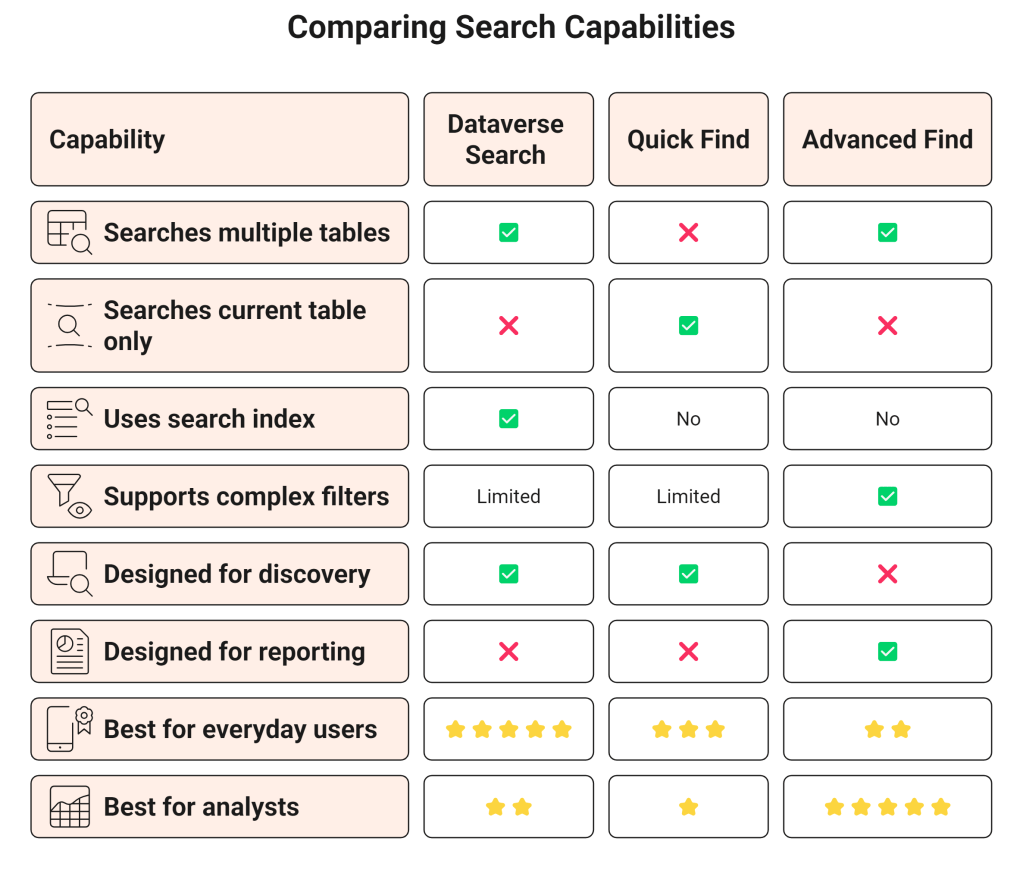

By now, we have uncovered two important truths about Dataverse Search.
First, it doesn’t search the database directly.
Second, it relies on a dedicated search index that is continuously maintained in the background.
But if Dataverse Search is so powerful, why do Quick Find and Advanced Find still exist?
It’s a question many developers ask when they first start working with model-driven apps.
The answer is simple:
These tools aren’t competitors—they solve different business problems.
Understanding when to use each one can dramatically improve both user experience and application performance.
Three Different Questions
Although all three features search data, they’re answering completely different questions.
Dataverse Search asks:
“I know something about this record. Can you find it for me?”
Example:
Contoso
or
John Smith
or
INV-10245
The goal is speed.
Users want the correct record as quickly as possible without navigating through tables.
Quick Find asks:
“Can you search within this table?”
Imagine you’re already viewing the Accounts table.
You want to find:
Contoso Manufacturing
Quick Find only searches within the current table.
It doesn’t search Contacts.
It doesn’t search Opportunities.
It doesn’t search Cases.
Its purpose is to help users quickly locate records while already working in a specific area of the application.
Advanced Find asks:
“Show me every record that matches these business conditions.”
This isn’t really search.
It’s querying.
Examples include:
- Accounts created this month
- Cases with High Priority
- Opportunities over $50,000
- Contacts without an email address
- Leads owned by a specific team
Advanced Find allows users to build structured queries using multiple conditions, relationships, sorting, and filtering.
Its strength isn’t speed.
Its strength is precision.
A Real Business Scenario
Imagine you’re a customer service representative.
A customer calls and says:
“Hi, this is John from Contoso.”
The fastest option?
Dataverse Search.
Type:
John Contoso
Within seconds, you may see:
- Contact
- Account
- Open Cases
- Opportunities
No navigation required.
Now imagine you’re already working in the Cases table.
You simply need one case.
Quick Find is perfect.
It searches only cases, making the experience focused and uncluttered.
Finally, imagine your manager asks:
“Show me all unresolved cases created this month with High Priority.”
Neither Dataverse Search nor Quick Find is designed for that.
That’s exactly where Advanced Find excels.