

In the previous articles, we explored the search-related settings available in the Power Platform Admin Center and learned how Search Indexing, Global Search, Quick Find, and Microsoft 365 integration work together to deliver a modern search experience.
Now we arrive at one of the most important questions in the entire series:
How does Dataverse decide which tables and fields become searchable?
The answer isn’t “everything.”
Dataverse Search is designed to be selective. It indexes only the tables and fields that administrators choose, helping balance performance, relevance, and storage.
In this article, we’ll explore how searchable tables are configured, how indexed fields are counted, what synchronization looks like, and why thoughtful design is far more important than indexing everything.
The Search Index Isn’t Your Database
One of the biggest misconceptions is that Dataverse Search scans every table whenever a user searches.
It doesn’t.
Instead, Dataverse maintains a dedicated search index containing only approved searchable information.
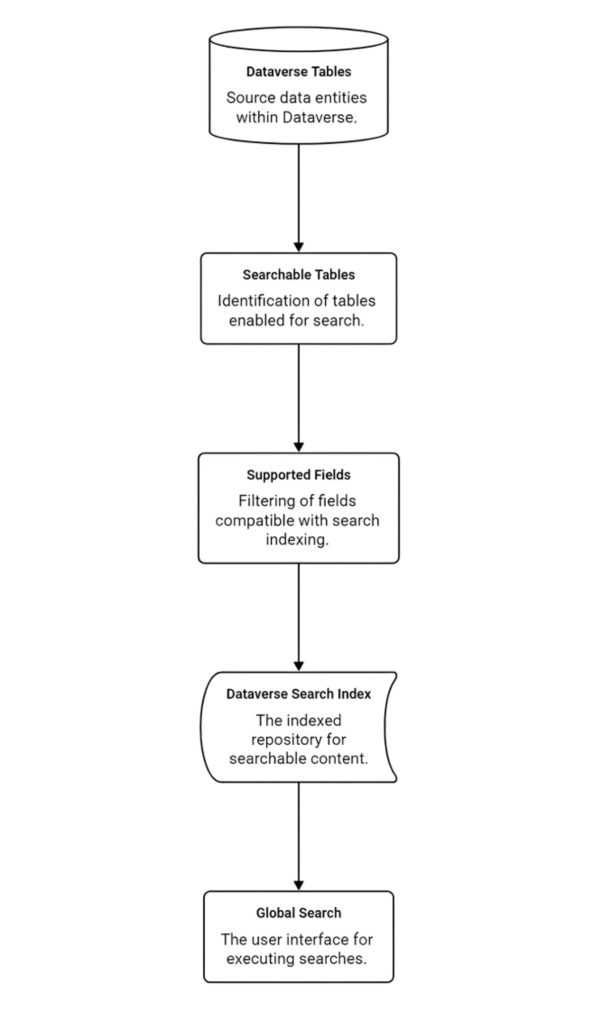
Think of the search index as a carefully curated catalogue rather than a copy of your database.
Configuring the Search Index
Searchable tables are managed from the Power Apps maker experience.
Administrators can choose which tables participate in Dataverse Search.
Not every table should be included.
Business tables such as Accounts, Contacts, Cases, Opportunities, Products, and Knowledge Articles are excellent candidates.
Technical tables, integration logs, staging tables, plugin trace logs, and temporary data generally add little value to users and only increase index size.
Good candidates
- Accounts
- Contacts
- Leads
- Opportunities
- Cases
- Products
- Knowledge Articles
- Business-specific custom tables
Poor candidates
- Audit tables
- Integration logs
- Plugin Trace Logs
- Temporary staging tables
- Configuration tables
- Synchronization tables
The goal isn’t to maximise the number of indexed tables.
The goal is to maximise the quality of search results.
Understanding the Indexed Field Budget
One of the most overlooked limitations of Dataverse Search is the indexed field budget.
Microsoft allows:
- Up to 1,000 indexed fields per environment.
- The first 50 fields are allocated by default.
Not every field consumes the same amount of index capacity.
| Field Type | Index Cost |
|---|---|
| Text | 1 |
| Number | 1 |
| Date | 1 |
| Lookup | 3 |
| Choice (Option Set) | 2 |
This means a table containing many lookup and choice columns can consume index capacity much faster than expected.
Why this matters
Imagine two custom tables.
Table A
- 30 text fields
Consumes approximately 30 index slots.
Table B
- 10 lookup fields
- 10 choice fields
- 10 text fields
Consumes approximately:
- Lookups = 30
- Choices = 20
- Text = 10
Total = 60 index slots
Although both tables contain 30 columns, the second consumes twice the search index capacity.
This is why careful field selection matters.
Choosing Searchable Fields
Selecting searchable tables is only the first step.
Dataverse also needs to know which fields users should search.
This is where the Quick Find View comes in.
The Quick Find View determines:
- The fields users can search.
- The fields displayed in search results.
- The filters applied when returning records.
We’ll dedicate the next article entirely to Quick Find Views because they deserve a much deeper discussion.
For now, remember this simple principle:
A searchable table without a well-designed Quick Find View is like a library without a catalogue.
Synchronization and Index Updates
Another common question is:
“I added a field. Why can’t users search it immediately?”
Dataverse Search doesn’t update instantly.
Changes are synchronized in the background.
Microsoft notes the following general expectations:
- Configuration changes typically appear within about 15 minutes.
- Most organizations complete synchronization within approximately one hour.
- Large environments containing significant amounts of data may require considerably longer.
Understanding this behaviour helps set realistic expectations during deployments.
Designing for Relevance
Adding every table and every field rarely improves search.
Instead, it creates noise.
Good search design asks questions such as:
- What information do users actually search for?
- Which identifiers matter?
- Which tables are used daily?
- Which technical tables should remain hidden?
The quality of search is determined far more by thoughtful design than by the number of indexed objects.
Common Mistakes
Some of the most common implementation mistakes include:
❌ Indexing every custom table.
❌ Adding every available field.
❌ Ignoring lookup field costs.
❌ Exceeding the indexed field budget.
❌ Expecting synchronization to be immediate.
❌ Treating search as a technical feature rather than a user experience.
Best Practices
When designing enterprise search solutions, I generally recommend:
- Index only business-facing tables.
- Review indexed field usage before adding new custom tables.
- Keep search focused on business identifiers.
- Monitor indexed field consumption as your environment grows.
- Test search with real users instead of relying solely on technical validation.
Search quality improves through thoughtful curation not volume.
Key Takeaways
The Dataverse Search Index is not a copy of your database.
It is a carefully curated collection of searchable business information.
Great search experiences are built by making deliberate choices about:
- Which tables participate.
- Which fields become searchable.
- How index capacity is managed.
- How synchronization is planned.
- How users actually discover information.
Design those elements well, and Dataverse Search becomes one of the most powerful productivity features in your environment.

