

Every few months I see another discussion where someone says:
- “Dataverse API limit is 6000.”
- “No, it’s 40,000 requests.”
- “Actually it’s 250,000.”
- “Power Automate allows 500,000.”
Everyone sounds correct.
Yet everyone is talking about a completely different limit. That is exactly why Power Platform limits are so confusing.
Microsoft hasn’t created one limit. They have created multiple protection systems, each solving a different problem.
If you don’t know which one you’re hitting, you’ll almost certainly apply the wrong fix.
Why This Is So Confusing
Imagine walking into an airport.
You ask:
“What’s the airport limit?”
The staff would probably look at you strangely.
Which limit?
- Passenger limit?
- Baggage limit?
- Runway capacity?
- Immigration queue?
- Security screening?
- Parking spaces?
Every answer would technically be correct. But none answers your question. Power Platform works exactly the same way.
The Different Limits
Instead of one limit…
You actually have multiple independent systems.
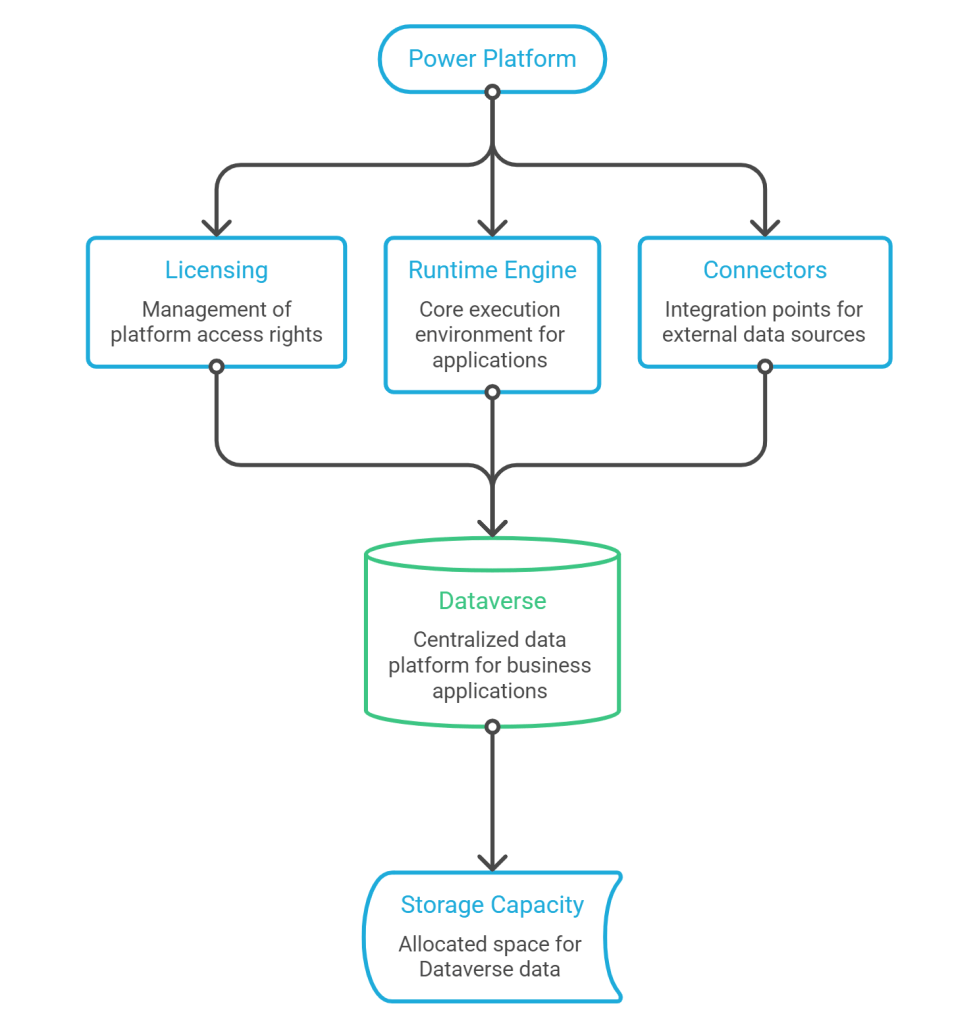
Each layer protects something different. Each has different rules. Each fails differently.
The Seven Layers
| Layer | Protects | Typical Error |
|---|---|---|
| Licensing | Fair platform usage | Request allocation exceeded |
| Power Platform Requests | Daily consumption | Rolling 24-hour limits |
| Runtime | Flow engine | Delayed or suspended flows |
| Connectors | External systems | HTTP 429 |
| Dataverse Service Protection | Database resources | Retry-After responses |
| Dataverse Capacity | Database growth | Storage warnings |
| Environment Capacity | Tenant resources | Capacity alerts |
Notice something?
Only one of them is actually about APIs.
Why Buying More Licenses Doesn’t Always Help
This is probably the biggest misconception.
Imagine your Dataverse connector starts returning:
HTTP 429
Retry After : 20 seconds
Many organisations immediately think
“We need more Power Platform Requests.”
Maybe.
Maybe not.
If the problem is Dataverse Service Protection… Buying another Premium license changes absolutely nothing.
Likewise…
If you’re exceeding your daily request entitlement… Reducing Dataverse concurrency won’t help either.
Different problem. Different solution.
Instead of asking
“What is the limit?”
Start asking
Which system is protecting itself?
That single question changes everything.
The Mental Model
Here’s the framework I’ll use throughout this series.
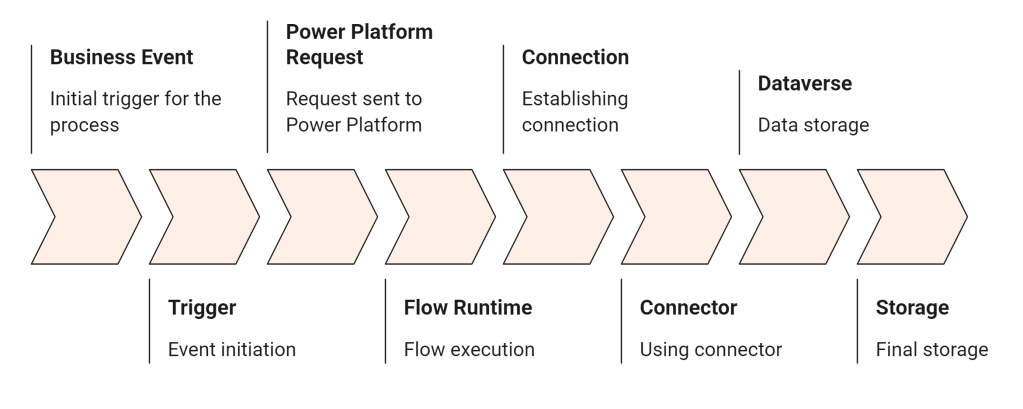
Every request travels through every one of these layers.
Every layer can say
“No.”
But for a completely different reason.
Real World Example
Let’s say a customer tells you
“Our flow suddenly became slow after working perfectly for three years.”
Most developers immediately investigate the flow itself.
You should ask different questions.
- Has data volume increased?
- Did retry behaviour change?
- Is the connector throttling?
- Is Dataverse protecting itself?
- Is the owner approaching request limits?
- Has concurrency increased?
- Has another team introduced competing workloads?
Those questions usually uncover the real cause much faster than staring at the flow designer.
Key Takeaways
By the end of this article, remember these three points:
✔ There is no single Power Platform API limit.
✔ Every limit protects a different part of the platform.
✔ Understanding which layer is enforcing the limit is the first step toward solving the problem.

