

Understanding Flow Owners, Connections, Service Accounts, and Application Users
The Four People Behind Every Flow
Imagine a warehouse.
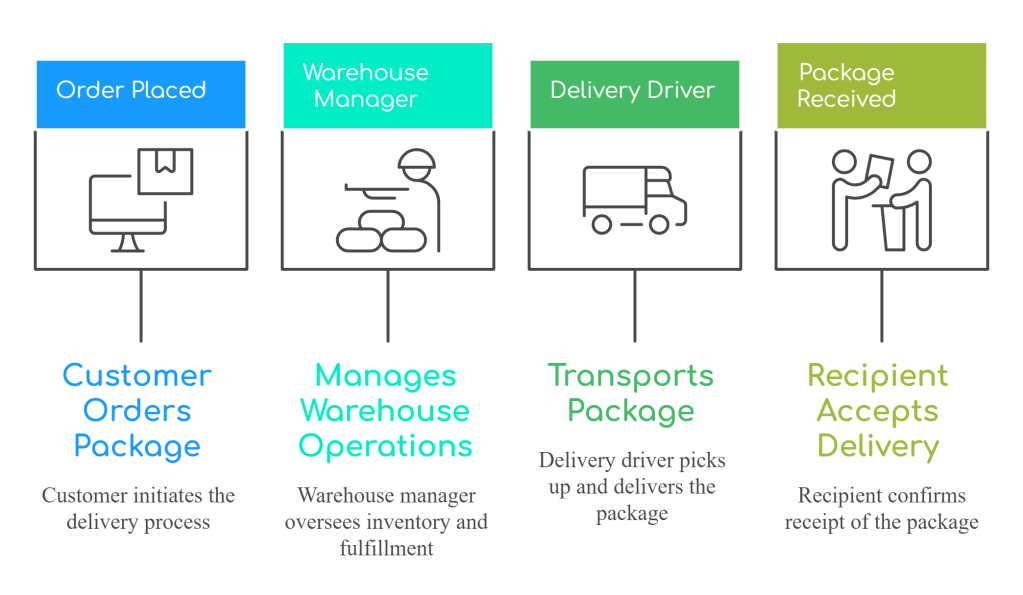
Power Platform works the same way.
Identity 1 – The Triggering User
This is the person or system that starts the journey.
Examples:
- A user updates a Case.
- A customer submits a form.
- An email arrives.
- A scheduled timer fires.
This identity answers one question:
Who started the process?
It doesn’t necessarily answer:
Who pays for the requests?
Identity 2 – The Flow Owner
Every flow has an owner.
Think of this person as the project manager.
They created the automation. They maintain it.
Depending on the flow type and licensing model, this identity can determine where request entitlements are associated.
The owner isn’t always the person who triggered the flow. And they often aren’t the connection user either.
Identity 3 – The Connection User
Now imagine the flow needs to update Dataverse. It must authenticate. That’s where the connection comes in.
This might be:
- A personal account
- A shared service account
- A managed identity (where supported)
- Another authenticated identity
Think of this as the driver delivering the package. The driver carries the credentials needed to access the destination.
Identity 4 – The Application User
Many enterprise environments go one step further. Instead of individual users owning records, they use an application user for ownership or integration scenarios.
Application users aren’t people. They’re system identities designed for applications and integrations.
Their role is very different from an interactive service account.
This distinction is often misunderstood, especially in large Dynamics 365 implementations.
The Enterprise Reality
Let’s look at a common scenario.
  Business User
        │
        ▼
   Updates Case
        │
        ▼
Power Automate Flow
        │
        ▼
Owned by Application User
        │
        ▼
  Uses Connection
        │
        ▼
Authenticated as Service Account
        │
        ▼
     Dataverse
Now ask yourself:
Which identity owns the flow?
Which identity authenticated to Dataverse?
Which identity initiated the business event?
Those answers are not always the same.
That’s why simply saying “the service account is making all the requests” can oversimplify what’s actually happening.
Why This Matters
Imagine your organisation has:
- 450 cloud flows
- One shared service account
- Multiple application users
- Hundreds of business users
When something reaches a limit, which identity should you investigate first? Without understanding the role each identity plays, troubleshooting becomes guesswork.
Instead of asking:
“Which account is running the flow?”
Ask:
- Who triggered it?
- Who owns it?
- Which connection authenticated?
- Which identity interacted with Dataverse?
Each question reveals a different part of the architecture.
Key Takeaways
✅ A single Power Platform request can involve multiple identities.
✅ Triggering user, flow owner, connection user, and application user all serve different purposes.
✅ Understanding these identities is essential before investigating request allocations, licensing, or throttling.

