

If you’ve worked with Dataverse integrations long enough, you’ve probably encountered this number:
6,000 requests in five minutes.
It often gets repeated as:
“The Dataverse API limit is 6,000.”
But after the previous articles in this series, we should already know why that statement needs more context.
Dataverse doesn’t have one simple API limit.
The 6,000-request threshold is one part of Dataverse Service Protection API limits.
And there are actually three dimensions Dataverse considers:
Request count.
Execution time.
Concurrency.
You can stay comfortably below 6,000 requests and still be throttled.
That’s what makes Service Protection worth understanding properly.
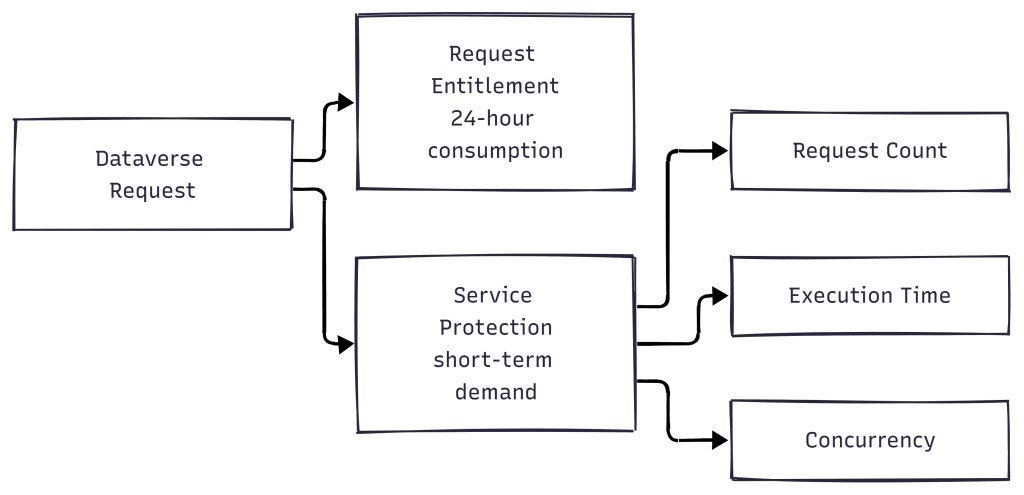
First: Service Protection Is Not Your Daily Request Entitlement
Before going into the numbers, we need to separate two concepts we’ve already discussed throughout this series.
Power Platform Request entitlement asks:
How much platform activity am I entitled to consume?
Dataverse Service Protection asks:
Is this client placing extraordinary demand on Dataverse right now?
Microsoft treats these as separate categories.
Power Platform Request entitlement is evaluated over a 24-hour period.
Dataverse Service Protection uses a much shorter five-minute sliding window for its request-count and execution-time measures, while concurrency protects against too many simultaneous requests.
When Service Protection is exceeded, Dataverse can immediately return:
HTTP 429 – Too Many Requests.
This is the first thing I would check whenever somebody says:
“We’re hitting the Dataverse API limit.”
Which limit?
If it’s a daily entitlement issue, reducing concurrency doesn’t necessarily solve the entitlement consumption.
If it’s Service Protection, buying additional daily request capacity doesn’t automatically remove the throttling.
Diagnosing the correct layer matters.
Why Does Dataverse Need Service Protection?
Dataverse is a shared cloud service.
One application shouldn’t be able to send such an aggressive workload that it negatively affects service availability for everyone else.
Microsoft describes Service Protection as protection against extraordinary API demand and unexpected request surges that could threaten platform availability and performance. Normal interactive users generally shouldn’t encounter these limits; they’re more relevant to applications performing high-volume data operations.
Think about an integration importing hundreds of thousands of records.
Or a Power Automate process suddenly processing a huge backlog.
Or an application firing many parallel Dataverse requests.
Without some form of protection, one badly designed workload could place enormous pressure on the service.
So Dataverse watches the workload from three different angles.
The Three Dimensions
Microsoft currently documents these default Service Protection values per web server:
| Measure | Default limit |
|---|---|
| Requests | 6,000 within a five-minute sliding window |
| Combined execution time | 1,200 seconds within a five-minute sliding window |
| Concurrent requests | 52 or higher |
These are default values, not contractual constants. Microsoft explicitly says the limits can change and may vary between environments. Each Dataverse web server available to an environment enforces the limits independently.
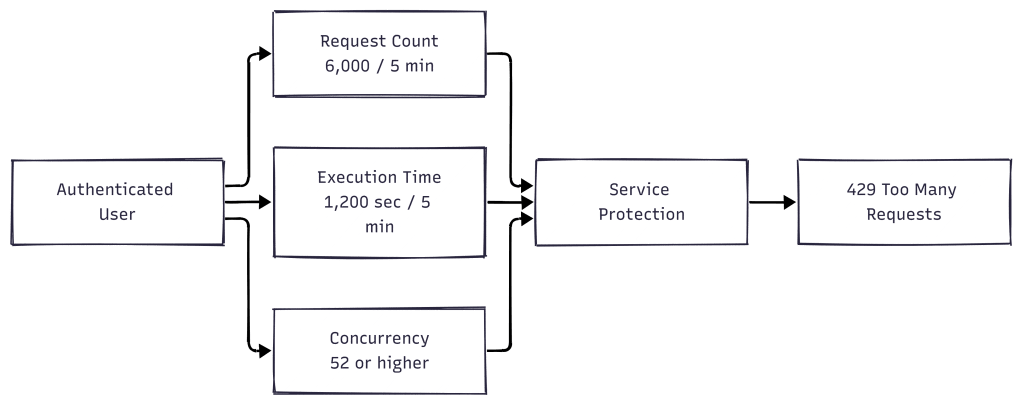
This is the diagram I’d keep beside me when troubleshooting.
Because any one of these dimensions can become the bottleneck.
Let’s look at them individually.
1. Request Count – The Famous 6,000
This is the number most Power Platform developers have heard.
Dataverse tracks the cumulative number of requests made by an authenticated user during the preceding 300 seconds.
The documented default is:
6,000 requests within a five-minute sliding window.
Notice the wording:
Sliding window.
This isn’t a fixed timer that resets neatly every five minutes.
At any point, Dataverse can evaluate the activity during the preceding 300 seconds.
So designing an integration around the idea of:
“We’ll hammer Dataverse with 6,000 requests and wait for the counter to reset.”
isn’t the right approach.
Microsoft recommends allowing the service to indicate what it can handle and responding appropriately when throttling occurs.
Why 6,000 Requests Isn’t the Whole Story
Suppose you discover the request-count limit.
You might immediately think:
“Easy. I’ll reduce the number of API calls by batching everything.”
That might reduce network round trips.
But Dataverse Service Protection isn’t watching only request count.
Microsoft deliberately has another dimension:
Execution time.
This prevents applications from simply finding ways around the request-count protection by making fewer but much heavier requests.
2. Execution Time – The Limit People Often Forget
Microsoft currently documents a default combined execution-time limit of:
1,200 seconds within a five-minute sliding window.
At first, that sounds strange.
How can you consume 20 minutes of execution time within five minutes?
Because we’re talking about combined execution time across requests.
Imagine multiple operations executing concurrently.
One request might consume several seconds of server processing.
Another runs at the same time.
Then another.
Their execution time contributes to the cumulative measure.
So you can stay well below 6,000 requests and still create an expensive workload.
For example, imagine an integration sends only a few hundred requests.
But every update triggers:
- synchronous plug-in logic
- validation
- complex queries
- cascading operations
- additional processing
The request count might look harmless.
The computation behind those requests might not be.
Microsoft specifically notes that operations such as complex queries, solution imports and batch operations can require substantial execution time.
This is why troubleshooting Service Protection by looking only at request count can send you in the wrong direction.
Plug-ins Add an Interesting Twist
There’s a subtle Dataverse behaviour worth understanding here.
Microsoft states that Service Protection limits aren’t directly applied to API calls originating internally from plug-ins and custom workflow activities.
Those operations run within Dataverse rather than calling the public API endpoint like an external client.
But that doesn’t mean plug-in execution is irrelevant.
Microsoft explains that the additional computation time contributed by plug-ins and custom workflow activities is added to the original request that triggered them and contributes to the Service Protection execution-time calculation.
Consider:

You might still see:
One external request.
But it can be a comparatively expensive request.
That’s one reason the execution-time dimension exists.
3. Concurrent Requests – Faster Isn’t Always Better
Now we get to concurrency.
Developers naturally want integrations to finish quickly.
Instead of processing:

we parallelise them.
That can significantly improve throughput.
And Microsoft actually recommends parallelism as one technique for maximising Dataverse throughput.
But there needs to be control.
Dataverse currently documents a default concurrent-request limit of 52 or higher per authenticated user, per web server. The actual value can be higher in some environments.
Unlike the request-count and execution-time limits, exceeding the concurrency limit can result in an immediate error.
This matters for Power Automate too.
Imagine an Apply to each processing thousands of Dataverse records with aggressive concurrency.
Then imagine several flows doing the same thing through the same authenticated identity.
Individually, each flow might look reasonable.
Collectively, they can create a substantial burst of simultaneous Dataverse traffic.
Which brings us straight back to Part 8.
The Authenticated Identity Matters
Dataverse evaluates Service Protection limits for each authenticated user independently.
If one authenticated user generates extraordinary demand, that user can be limited without other users being affected.
Microsoft also explicitly states that application users aren’t treated differently for these limits—the same Service Protection model applies.
This is why the shared service-account architecture from Part 8 matters.
If many workloads authenticate to Dataverse using the same identity, you’re creating a concentration point for their Dataverse traffic.
This doesn’t mean:
“Never use a shared identity.”
It means the authenticated identity should be considered part of the workload architecture.
Don’t look at Flow A, Flow B and Integration C independently if all three eventually present the same credentials to Dataverse.
So What Happens When You Hit the Limit?
For Web API requests, Dataverse returns:
HTTP 429 – Too Many Requests.
But the 429 isn’t simply Dataverse saying:
“Come back later.”
The response includes an important piece of information:
Retry-After
For the Web API, the Retry-After header provides the number of seconds the client should wait before sending more requests.
For the Dataverse SDK for .NET, the equivalent information is available through the returned fault details.
And the duration isn’t necessarily always the same.
Microsoft explains that Retry-After depends on the nature of the workload during the preceding period. If an application continues generating demanding traffic, the retry duration can increase.
So the server is effectively giving the client feedback:
You’re sending more than I can comfortably process. Wait this long before trying again.

Simple diagram.
But extremely important behaviour.
Your integration shouldn’t immediately hammer Dataverse again after receiving a Service Protection response.
Respect Retry-After.
Power Automate Retries Need Context Too
Power Automate provides retry capabilities, which are useful for transient failures.
But retries don’t make poor workload design disappear.
Imagine a flow processing thousands of records with high concurrency.
Dataverse starts returning 429 responses.
Operations retry.
Meanwhile other flows using the same Dataverse identity continue running.
You can end up with:
Heavy workload ↓429 ↓Retry ↓More workload ↓More throttling
The goal isn’t to disable retries.
The goal is to combine sensible retry behaviour with sensible workload distribution and concurrency.
For custom integrations, Microsoft specifically recommends waiting for the Retry-After duration before resuming requests.
Can I Beat the Limit With Batching?
This is another common misconception.
Suppose you have 1,000 operations.
Instead of sending 1,000 separate requests, you package operations into batches.
Does that mean you’ve beaten Dataverse limits?
No.
Batching can reduce network overhead and affect how you interact with the Service Protection request-count dimension, but Microsoft specifically warns that batch operations aren’t a valid strategy for bypassing Power Platform entitlement limits.
The CRUD operations still accrue against entitlement limits regardless of whether they’re included in a batch.
And for Service Protection, large batches can shift the pressure elsewhere.
Microsoft notes that bigger batches increase execution time per request, which can make the execution-time limit the bottleneck instead of request count.
So:
Fewer HTTP requests ≠Less Dataverse work
That’s an important design distinction.
More Parallelism Isn’t Always More Throughput Either
The same principle applies to concurrency.
Increasing parallelism can improve throughput—up to a point.
After that, you may simply hit Service Protection more aggressively.
Microsoft recommends allowing Dataverse to help determine the appropriate level of parallelism. For custom clients, Dataverse can return an x-ms-dop-hint response header indicating a recommended degree of parallelism for that environment.
So rather than thinking:
“What’s the maximum concurrency I can configure?”
a better engineering question is:
“What level of concurrency gives this workload the highest sustainable throughput?”
Those are very different goals.
Maximum concurrency can create the biggest burst.
Optimal concurrency aims to move the most work successfully over time.
Nightly Batch Jobs Deserve Special Attention
Microsoft makes another recommendation that I think is particularly relevant to enterprise Power Platform environments.
If an integration relies on large nightly, weekly or monthly jobs that push huge amounts of data through Dataverse in a short period, consider whether the architecture could move towards more real-time integration.
Why?
Because Service Protection is specifically designed to smooth extraordinary bursts of demand.
Imagine processing 100,000 changes at 1:00 AM.
Compare that with processing changes gradually as they happen throughout the day.
The total amount of business activity might be similar.
The load profile is completely different.
This doesn’t mean every batch process should become real-time.
There are perfectly valid reasons for scheduled processing.
But if you’re constantly fighting Service Protection on huge scheduled workloads, changing the shape of the workload can be more effective than endlessly tuning retries.
How I Would Troubleshoot a Dataverse 429
When I see a Dataverse 429, I wouldn’t immediately increase request capacity.
I’d first identify which Service Protection dimension the workload is stressing.
If it’s request count, investigate the volume and frequency of API calls.
If it’s execution time, investigate expensive operations, complex queries, plug-ins and other processing triggered by those requests.
If it’s concurrency, investigate parallel execution and how many workloads are simultaneously using the same authenticated identity.
Then inspect the workload pattern.
Is this one integration?
Several flows?
A nightly spike?
A shared service account?
A bulk migration?
A portal?
A large Apply to each?
Only after understanding the shape of the workload would I decide whether the solution is reducing concurrency, optimising operations, distributing processing, changing schedules, improving retry behaviour, or redesigning the integration.
The error is the symptom.
The workload pattern is what needs diagnosing.
Don’t Design for 6,000
If there’s one idea I’d carry away from this article, it isn’t:
“Dataverse allows 6,000 requests every five minutes.”
That’s useful reference information, but it’s not a design strategy.
Microsoft explicitly states that these numbers are default values and can vary between environments.
The more useful model is:
Dataverse watches request volume, processing cost and concurrency.
Your job isn’t to stay one request below a magic number.
Your job is to create a workload that can operate efficiently, handle throttling correctly and adapt when Dataverse tells it to slow down.
That’s a much more scalable way to think about Service Protection.
One More Layer Remains
We’ve now separated:
Power Platform Request entitlement
from:
Dataverse Service Protection.
But Dataverse isn’t the only service capable of limiting a cloud flow.
Power Automate itself has runtime and throughput limits.
So imagine a flow failing even though:
- Daily request entitlement looks healthy.
- Dataverse isn’t returning a Service Protection error.
Where do we look next?
At the automation engine itself.

