

“All our Power Automate connections use the same service account.”
I’ve seen this architecture many times.
At first, it sounds sensible.
Instead of connections belonging to individual developers, create something like:
svc-powerplatform@contoso.com
Use that account for Dataverse connections.
Build connection references around it.
Then your flows aren’t dependent on Bob, Sarah or John remaining with the organisation.
Problem solved.
Well… partially.
A shared service account might solve one lifecycle problem, but it can quietly create a completely different architectural problem.
And to understand why, we need to separate two things that are frequently treated as though they’re the same:
Who owns the automation?
and
Who authenticates the request to Dataverse?
They can be completely different identities.
Let’s Start With a Typical Enterprise Setup
Imagine we have moved towards a more mature ownership model. Our production flows aren’t owned by developers anymore.Instead, solution-aware flows are owned by a service principal application user.
That gives us something like this:
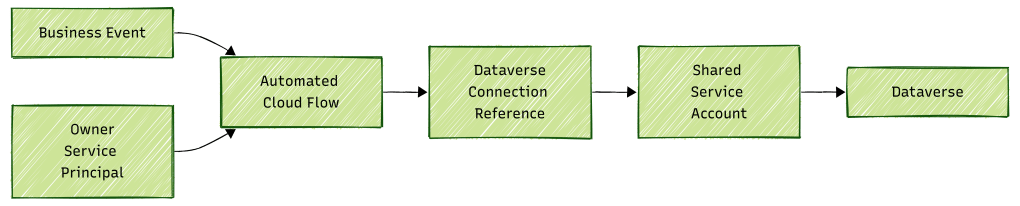
At first glance, there are only a few components. But there are actually several identity contexts involved.
The business event may have been initiated by a user.
The flow is owned by a service principal.
The connection reference points to a connection.
And that connection authenticates to Dataverse using the shared service account.
This distinction matters because Microsoft applies different limits at different layers.
Flow Owner and Connection User Are Not the Same Thing
This is probably the most important concept in this article.
For an automated or scheduled cloud flow, Microsoft states that the limits of the process owner apply regardless of what caused the process to start or which accounts are used by connections within the process.
So imagine:
Flow Owner =Application User ADataverse Connection =svc-powerplatform@contoso.com
It would be incorrect to automatically conclude:
“The service account owns all the Power Platform Request consumption because the connection uses that account.”
For the automated flow’s Power Automate request entitlement, the ownership/licensing context matters.
Microsoft also explicitly clarifies that a service principal used inside a connection doesn’t cause the flow to consume the service principal owner’s non-licensed action limits. Those limits apply when the service principal is the flow owner.
But then the Dataverse request reaches another layer.
And Dataverse has its own protection mechanisms.
That’s where things get interesting.
One Request, Two Different Identity Questions
Consider this architecture:
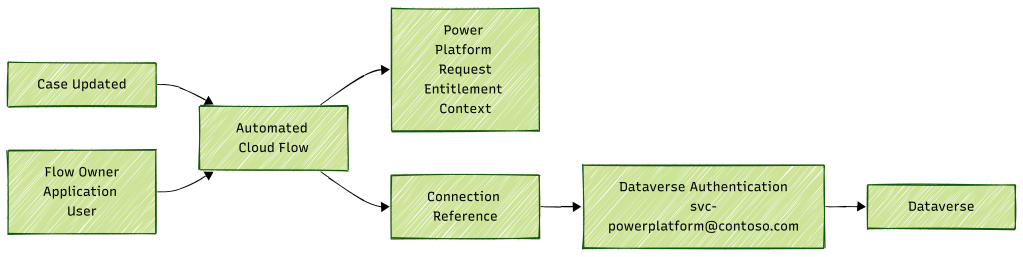
There are two different questions here.
Question 1
Whose Power Platform Request entitlement applies to the automated flow?
That takes us towards the flow owner and its applicable licensing context.
Question 2
Which authenticated identity is making requests against Dataverse?
That takes us towards the connection identity.
Those aren’t necessarily the same person or identity.
A useful mental model is:
Ownership helps determine where the daily Power Platform Request entitlement comes from. The connection determines which credentials are presented to the downstream service.
And that downstream service can have its own protection limits.
Enter Dataverse Service Protection
This is where we need to briefly introduce a topic that we’ll explore much more deeply in Part 9.
Dataverse has Service Protection API limits.
These aren’t the same as the daily Power Platform Request allocations we’ve spent the last few articles discussing.
Microsoft explains that these limits exist to protect Dataverse from extraordinary API demand and unexpected request surges.
Dataverse evaluates three main dimensions:
| Dimension | Default documented value |
|---|---|
| Requests | 6,000 within a five-minute sliding window |
| Combined execution time | 1,200 seconds within a five-minute sliding window |
| Concurrent requests | 52 or higher |
These values are enforced per authenticated user and per web server, and Microsoft notes that the actual limits can vary between environments.
That phrase is important:
per authenticated user.
Now go back to our shared service account architecture.
What Happens When 100 Flows Use the Same Connection Identity?
Imagine the organisation has grown.
We now have:
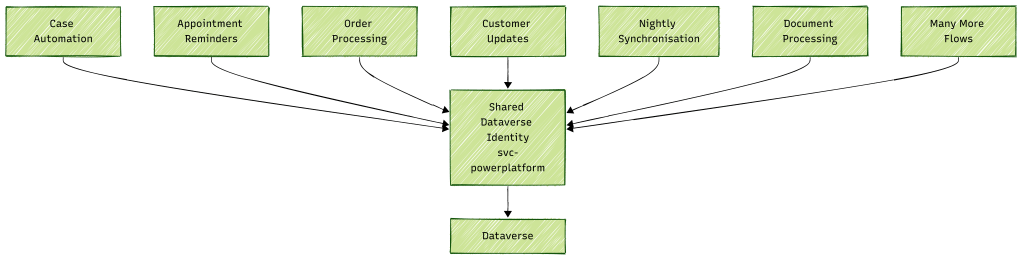
Individually, none of these flows might look particularly dangerous.
Case Automation might process 500 records.
Appointment Reminders might process 1,000.
Order Processing might handle 2,000.
Nightly Synchronisation might process 5,000.
The problem becomes visible when several workloads run at the same time.
From Dataverse’s perspective, if the same authenticated identity is being used, the traffic is concentrated on that identity for Service Protection evaluation.
Microsoft states:
Service Protection API limits are evaluated for each authenticated user independently.
So the problem isn’t necessarily:
“Flow A is making too many requests.”
The bigger architectural question becomes:
“How much traffic are all workloads collectively pushing through this authenticated Dataverse identity?”
The 1:00 AM Problem
Here’s a scenario that should feel familiar in many mature Power Platform environments.
Over the years, different teams create scheduled automation.
Eventually:
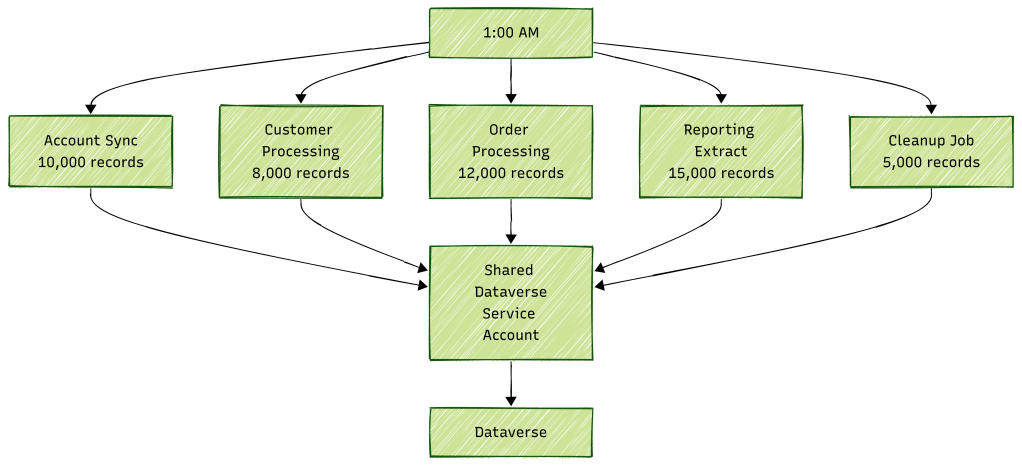
Each team may have tested its own automation successfully.
Each individual flow might be perfectly reasonable.
But nobody tested:
All of them together at 1:00 AM through the same authenticated identity.
Now add Apply to each concurrency.
Add retries.
Add plug-ins triggered by Dataverse updates.
Add complex queries.
Suddenly, request count isn’t the only concern.
Dataverse also considers combined execution time and concurrent requests.
That is why a shared identity can become a concentration point.
Then Comes HTTP 429
Eventually somebody opens Power Automate one morning and finds failed or delayed runs containing:
429 – Too Many Requests
The immediate reaction is often:
“We’ve exceeded our Power Platform Request allocation.”
But that conclusion might be completely wrong.
Remember the layers we’ve built throughout this series:

A Dataverse Service Protection 429 is different from exceeding your daily Power Platform Request entitlement.
Microsoft describes Dataverse entitlement limits and Service Protection limits as two separate categories. Service Protection limits can immediately return 429 Too Many Requests when exceeded.
So before attempting to solve a 429, ask:
Which service returned it?
That’s much more useful than simply asking whether you’ve “hit the API limit.”
More Licensing Doesn’t Automatically Fix This
Now imagine the organisation responds by purchasing additional request capacity.
That might increase an applicable request entitlement.
But look at our architecture again.

We’ve increased how much workload we’re entitled to consume.
But we haven’t necessarily changed the rate at which one authenticated identity is sending requests to Dataverse.
The Service Protection problem can therefore remain.
A simple way to remember this is:
More daily capacity doesn’t automatically mean more instantaneous Dataverse throughput.
This is why diagnosing the correct layer matters before purchasing additional capacity.
Retries Can Make the Situation Worse
Power Automate can retry operations when transient failures occur.
Usually, that’s exactly what we want.
But imagine a large number of flows are throttled simultaneously.

If retry behaviour isn’t controlled appropriately, additional attempts can contribute more traffic.
Dataverse helps clients handle this through the Retry-After response.
Microsoft recommends respecting the returned Retry-After duration before sending additional requests.
So retries aren’t inherently bad.
The important point is that your workload should respond correctly to throttling rather than blindly continuing to hammer the service.
Service Accounts Also Create a Security Boundary
Limits aren’t the only reason to reconsider the “one service account for everything” pattern.
Imagine the same account is used for:
- Case automation
- Sales processing
- Field Service
- Finance integrations
- Customer communications
- Data synchronisation
What permissions does that account need?
Probably the combined permissions required by all those workloads.
That can gradually result in something like:
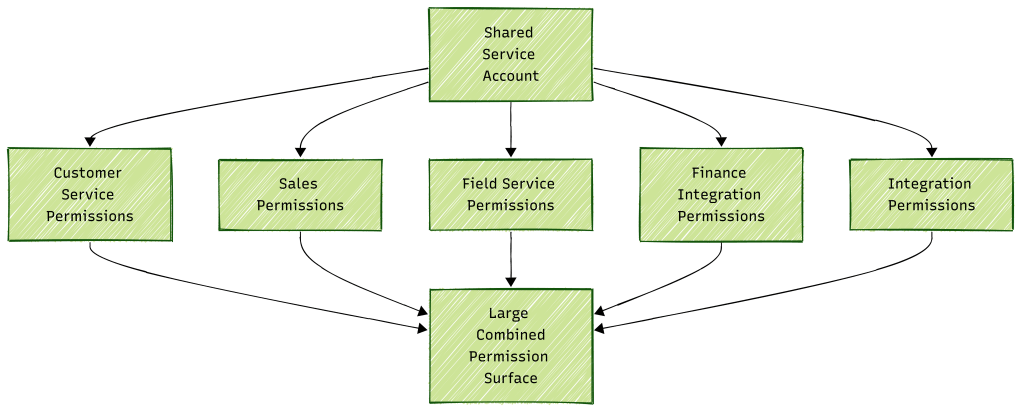
A workload that only needs to update appointment records might therefore authenticate using an identity that also has access to unrelated business data.
That’s not a request-limit problem.
It’s a security and operational design concern.
It demonstrates why identity design shouldn’t be driven solely by convenience.
What About Service Principal Ownership?
This is where service principals solve a different problem.
Microsoft specifically recommends considering service principal ownership for mission-critical departmental or enterprise flows because ownership is no longer tied to an employee’s lifecycle. It can also work well with DevOps deployment across environments.
A service principal application user can own and run Power Automate flows.
Microsoft also confirms that connections can be shared with that application user where required.
That gives us a much cleaner separation:
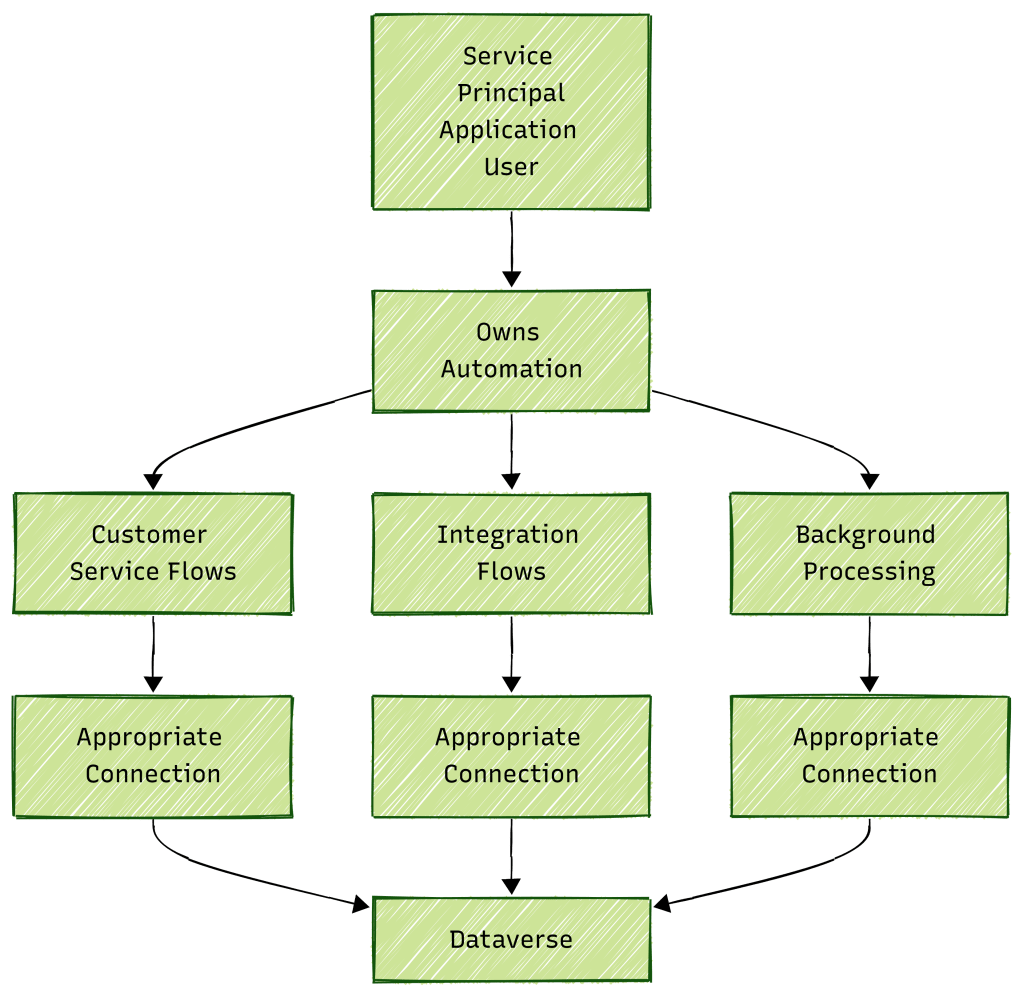
But service-principal ownership alone doesn’t magically solve every identity issue.
We still need to understand:
- What licensing model applies?
- Which connections does the flow use?
- Which identity authenticates those connections?
- What permissions does that identity have?
- Where does the request entitlement come from?
- Where could Service Protection limits concentrate?
Ownership and authentication still need to be designed deliberately.
Don’t Just Replace One Shared Account With One Shared Service Principal
There’s another trap here.
After learning about service principals, it’s tempting to say:
“Fine. We’ll replace
svc-powerplatform@contoso.comwith one service principal and use that everywhere.”
That may remove the human-style account dependency.
But if every integration and workload still authenticates through one identity, you may still have created a large technical concentration point.
The better design question isn’t:
“Service account or service principal?”
It’s:
“What should the identity boundary of this workload be?”
For example:
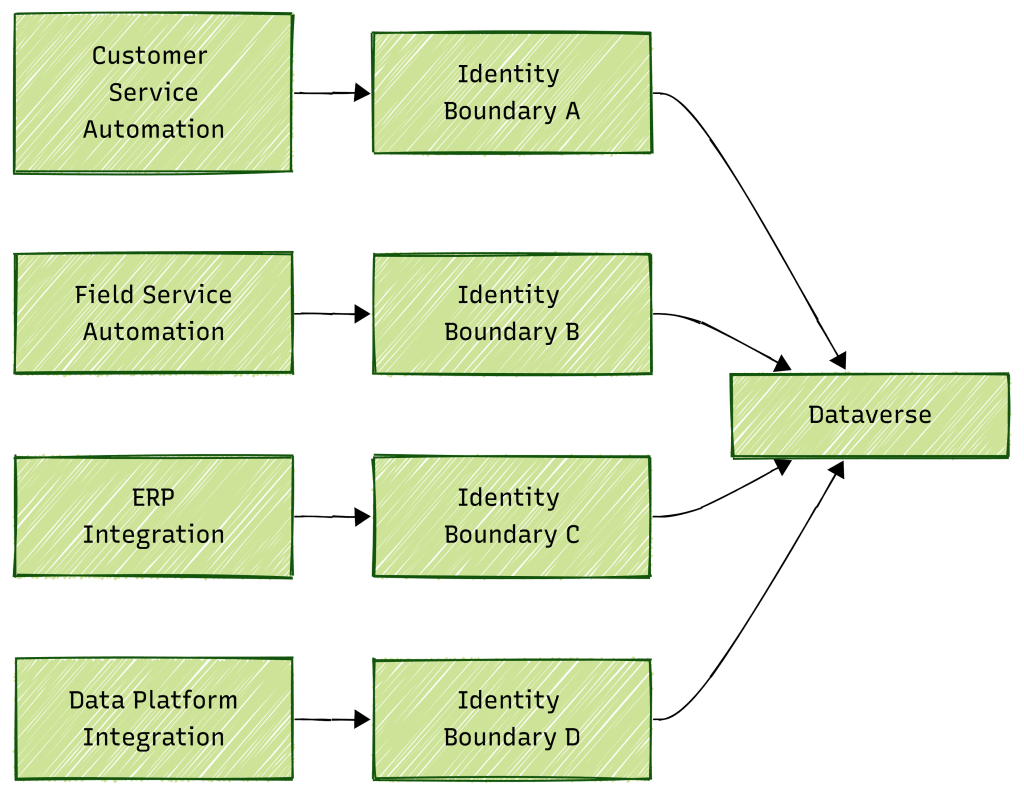
I’m deliberately calling these identity boundaries rather than prescribing that every workload must have its own application user.
There isn’t a universal “one identity per flow” rule.
The appropriate boundary depends on security, workload volume, operational ownership, licensing and the integrations involved.
A Better Way to Review Existing Environments
If I inherited a mature Power Platform environment using shared service accounts, I wouldn’t immediately start replacing every connection.
I’d first build an inventory.
For each important flow, capture:
| Question | Why it matters |
|---|---|
| Who owns the flow? | Determines management and can affect licensing/request entitlement |
| Is it automated, scheduled or instant? | Changes whose limits can apply |
| What licensing context applies? | Determines request entitlement |
| Which connection references are used? | Shows downstream dependencies |
| Which identity authenticates each connection? | Identifies concentration points |
| Which Dataverse permissions does it have? | Reveals security exposure |
| How frequently does the flow run? | Shows workload pattern |
| How many records does it process? | Indicates potential request volume |
| What concurrency is configured? | Indicates burst potential |
| What other flows run at the same time? | Reveals aggregate load |
Then map the estate.
You might discover:
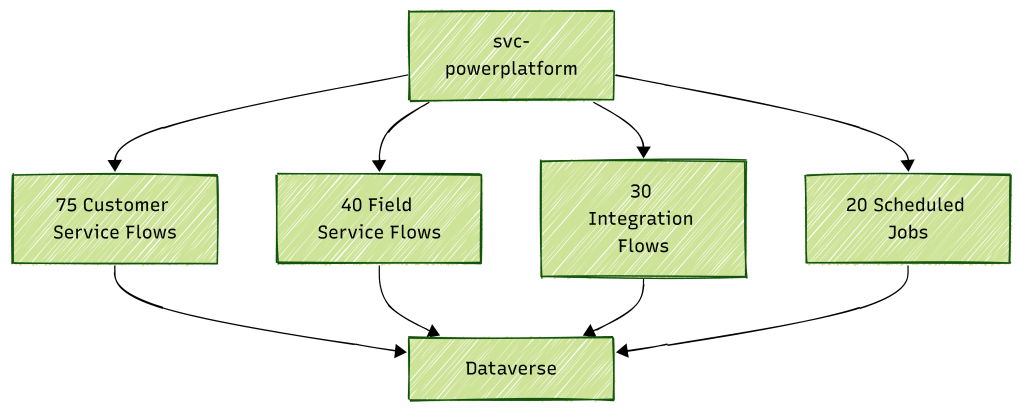
That diagram tells me much more than simply knowing:
“We have 165 flows.”
It shows where the workload is concentrated.
The Four Questions I Would Ask
When reviewing an enterprise automation workload, I now separate four questions:
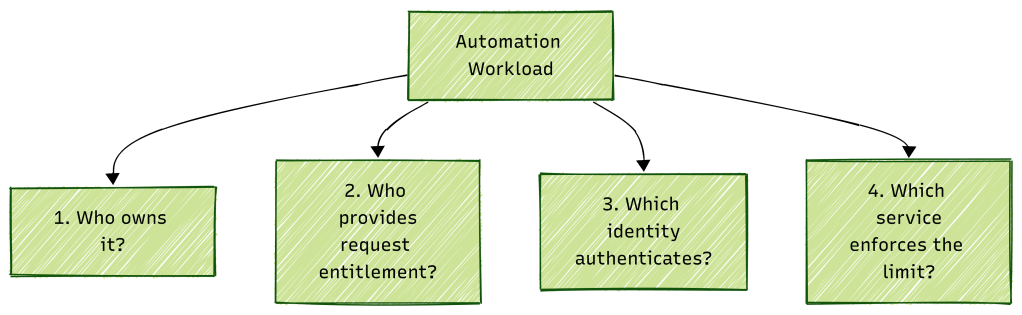
Those questions sound similar, but they’re not interchangeable.
Who owns it?
That’s about lifecycle and administration.
Who provides the request entitlement?
That’s about Power Platform Request licensing and allocation.
Who authenticates?
That’s about the credentials presented to Dataverse or another downstream service.
Which service is enforcing the limit?
That’s about determining whether the problem is Power Automate, a connector, Dataverse Service Protection, or something else.
Once we stop collapsing all four into the word “API limit”, troubleshooting becomes much easier.
This Brings Us to Dataverse Service Protection
We’ve now spent several articles working our way down the stack.
We started with Power Platform Requests.
Then we looked at what counts.
Then request allocations.
Then tenant pooling.
And now we’ve seen how the authenticated Dataverse identity can create another completely independent concentration point.
That leaves us with the obvious next question:
What exactly are Dataverse Service Protection limits, how are the 6,000 requests, 1,200 seconds and concurrent-request limits enforced, and what should our applications do when they hit them?
That’s what we’ll unpack next.

