

We saw that a licensed user can have an individual request entitlement, while a Process-licensed flow can have its own dedicated entitlement.
But Microsoft documentation introduces another concept:
Pooled non-licensed tenant-level requests.
The word pool is where things can become confusing.
If an organisation has hundreds of licensed users, it is tempting to imagine all those request allocations being poured into one giant bucket that every user, flow, application user and integration can consume.
That isn’t how the documented allocation model works.
The tenant pool we’re discussing here exists for a particular category of identities, and understanding that distinction becomes increasingly important as your Power Platform estate grows.
First, Let’s Clear Up What Isn’t Pooled
Imagine Contoso has 100 Power Automate Premium users.
From previous post, we know that Power Automate Premium currently has an official allocation of 40,000 Power Platform Requests per licensed user per 24 hours.
A simple calculation gives us:
100 × 40,000 = 4,000,000
It would therefore be very easy to assume that Contoso now has a shared pool containing four million requests.
But Microsoft explicitly states that Power Automate request capacity is tracked at the individual user or flow level and can’t simply be pooled at another level, such as the environment or tenant.
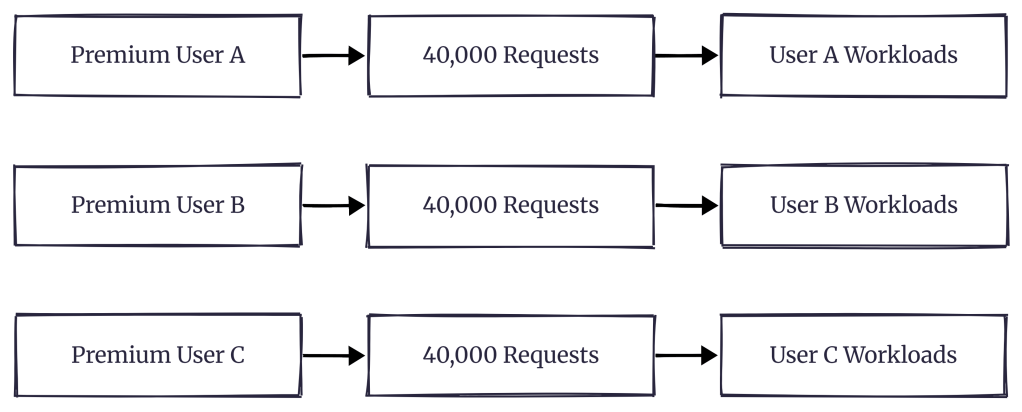
So this is not the model:

Instead, each licensed user retains their applicable entitlement.
Conceptually, it looks more like this:
They can all belong to the same Microsoft Entra tenant.
They can all work within the same Power Platform environment.
They might even use the same application.
But their normal licensed-user request entitlements aren’t simply combined into one giant tenant bucket.
So what exactly is the tenant pool?
Enter the Non-Licensed Tenant Pool
Dataverse supports several identities that don’t operate as normal licensed interactive users.
Microsoft specifically identifies:
- Application users
- Non-interactive users
- Administrative users
- SYSTEM
Rather than treating each of these identities like an individually licensed user, Microsoft provides a tenant-level request allocation for applicable non-licensed usage.
This gives us two very different allocation models.
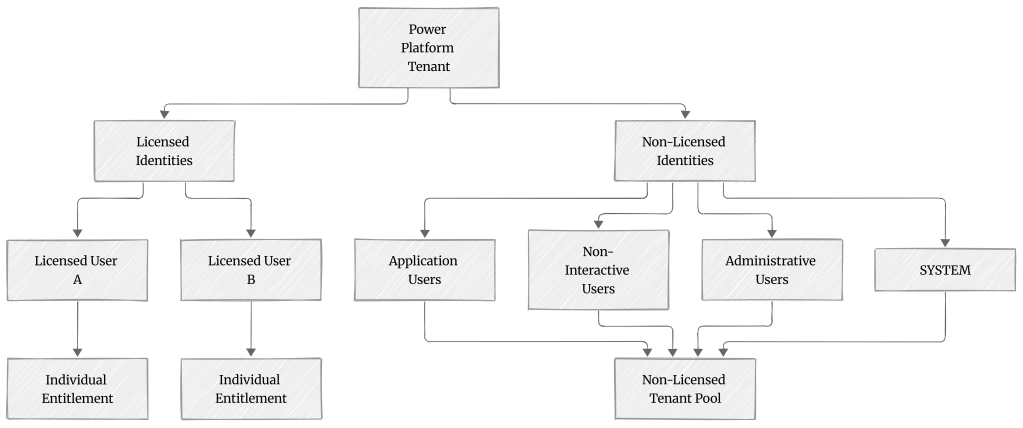
This diagram captures probably the most important distinction in this article:
Licensed-user capacity and the non-licensed tenant pool are separate allocation mechanisms.
How Large Is the Tenant Pool?
Now we can finally talk numbers.
The size of the non-licensed tenant pool depends on the licences held by the organisation.
For tenants with qualifying Dynamics 365 Enterprise or Professional licences, Microsoft currently documents:
500,000 base requests per tenant per 24 hours
plus:
5,000 requests per qualifying paid base user licence
up to a maximum documented allocation of:
10,000,000 requests per 24 hours.
There is an important detail hidden inside that calculation.
The additional capacity accrues from qualifying paid base licences. Under the Dynamics 365 base-and-attach licensing model, attach licences don’t independently add another 5,000 requests to this pool.
That matters when you’re estimating capacity for a large Dynamics organisation.
Let’s Put Some Real Numbers Around It
Imagine Contoso has:
200 qualifying Dynamics 365 Enterprise base licences.
The calculation becomes:
Base Tenant Allocation 500,000 +200 × 5,000 1,000,000 =1,500,000 Requests / 24 Hours
And now Contoso might have several workloads using application identities.
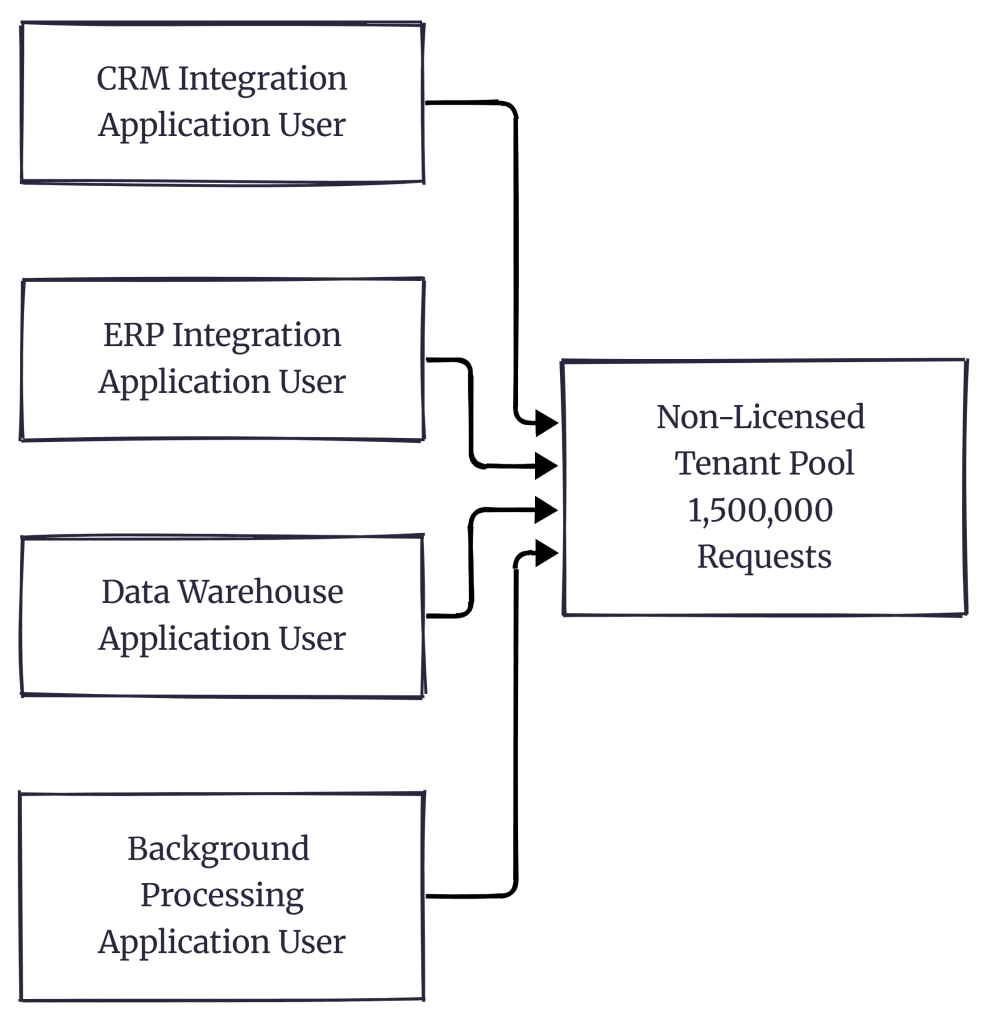
Here’s the important part.
Contoso doesn’t get:
Application User A = 1,500,000Application User B = 1,500,000Application User C = 1,500,000
The applicable non-licensed identities share the tenant-level entitlement.
Creating another application user doesn’t create another independent tenant pool.
Why This Matters for Integration Architecture
Separating integrations across application users is still often useful.
For example:
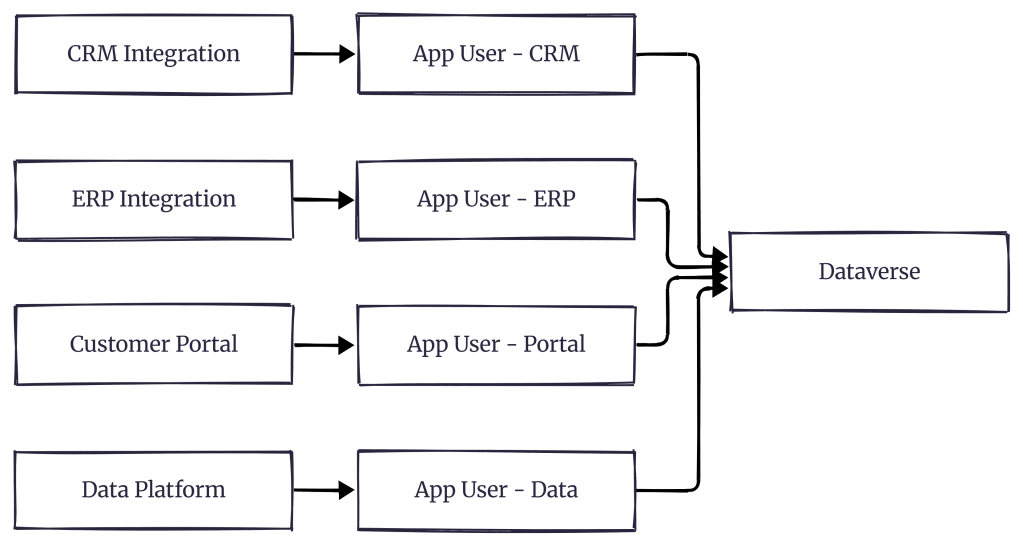
This separation can give you clearer security boundaries, permissions, auditing and workload ownership.
But don’t confuse identity isolation with request-entitlement isolation.
Those four application users may have separate Dataverse security roles and completely different responsibilities while still participating in the same applicable non-licensed tenant-level request allocation.
That’s an important consideration when an organisation starts creating application users for every new integration.
What About Power Apps and Power Automate Tenants?
Dynamics 365 isn’t the only scenario.
For applicable Power Apps-only or Power Automate-only scenarios, Microsoft documents a 25,000-request base tenant-level allocation per 24 hours for non-licensed usage, without the same per-licence accrual described for qualifying Dynamics 365 licences.
That creates an important difference between environments built primarily around Dynamics 365 and tenants built primarily around Power Apps or Power Automate.
But then another question appears.
What if your tenant has both?
Dynamics 365 + Power Apps + Power Automate
Consider an enterprise tenant containing:
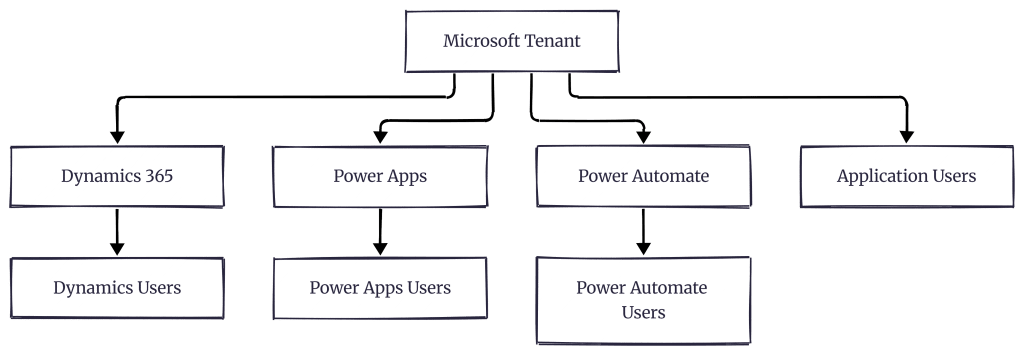
Should we calculate every product-line non-licensed allocation and add them together?
No.
Microsoft states that when multiple subscription types exist in the tenant, the non-licensed request capacity uses the product-line subscription that provides the larger number of requests.
Suppose Dynamics 365 gives our example organisation:
1,500,000
and the Power Apps/Power Automate applicable base is:
25,000
We don’t calculate:
1,500,000+25,000=1,525,000
The larger applicable product-line capacity determines the tenant-level non-licensed allocation.
In this example:
1,500,000 requests.
This is another reason the phrase “tenant pooling” needs some context.
Not every licence is contributing requests into the same giant bucket.
Now Let’s Bring Power Automate Into the Picture
This becomes particularly interesting when cloud flows are owned by application users or service principals.
Consider:
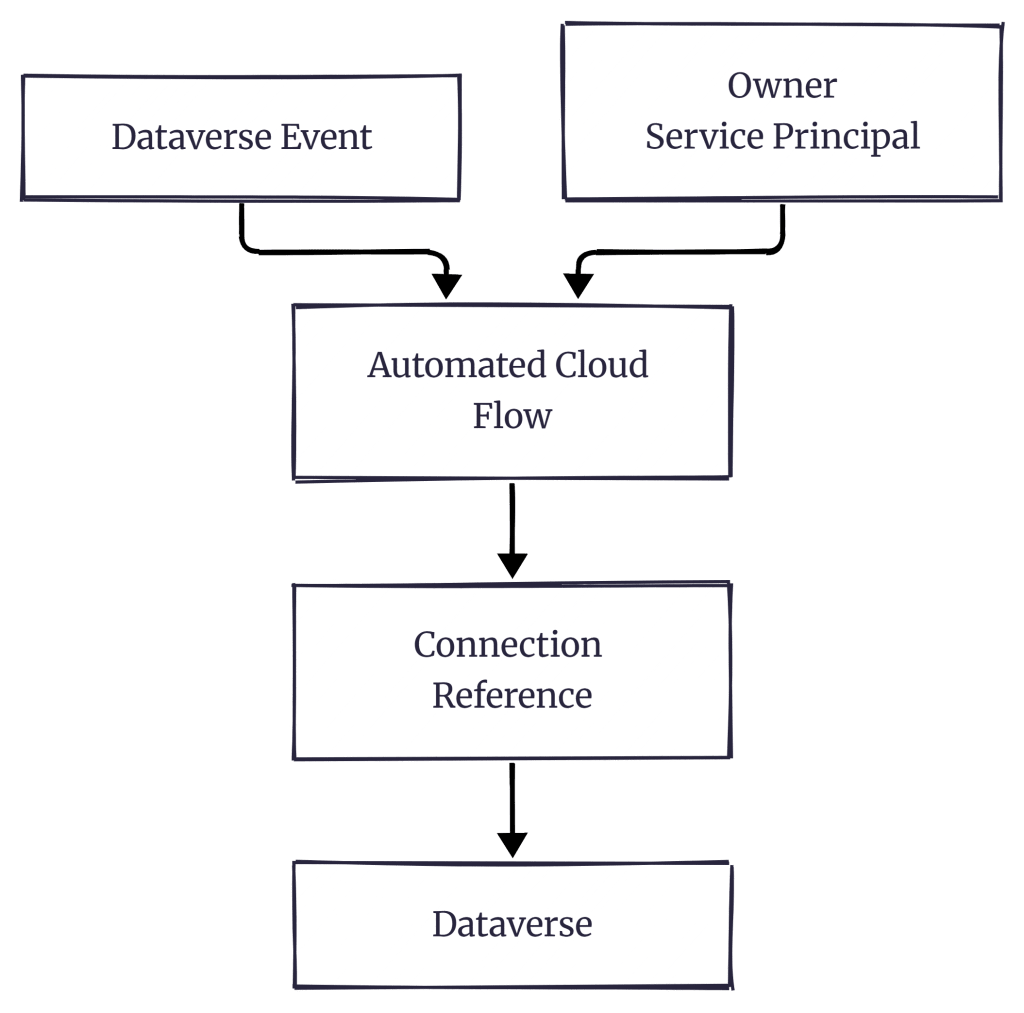
At first glance, it seems simple.
But several different questions are hiding inside this diagram:
Who owns the flow?
Which licensing context applies to that flow?
Which identity authenticates the Dataverse connection?
Which request entitlement is being consumed?
Those questions can’t be answered merely by looking at the connection reference.
As we covered earlier in this series, for automated and scheduled cloud flows the process owner’s entitlement context matters, while instant flows are associated with the invoking user’s limits.
For service-principal-owned flows, Microsoft documents several licensing contexts that can change which capacity is used.
For example, the flow might have:
- Power Automate Process licensing
- Legacy per-flow licensing
- An applicable Process-licensed flow group
- A designated licensed user
- An applicable Dynamics 365 application context
- A standard-connectors-only scenario
This is why saying:
“The application user gets X requests.”
can oversimplify the architecture.
A better question is:
Under which licensing and request-entitlement context is this workload running?
Process Licensing Can Change the Capacity Source
Let’s say we have a high-volume order-processing automation.
It doesn’t really belong to an individual employee.
It is a business process.
Instead of having the workload depend on an applicable non-licensed tenant pool, a Process licence can provide dedicated capacity to the licensed flow.
As discussed in Part 6, Microsoft documents 250,000 Power Platform Requests per Process licence per 24 hours.
Conceptually:

This doesn’t mean every application-user-owned flow should receive a Process licence.
It means Process licensing gives us another capacity model for workloads that need it.
That’s an architectural decision that should consider workload ownership, licensing context, expected volume and long-term growth.
The Pool Is Tenant-Level – Not Environment-Level
Here’s another important consequence.
Large organisations often have many Power Platform environments.
For example:

The non-licensed allocation we’re discussing is described by Microsoft at the tenant level, not as a separate entitlement automatically created for every environment.
Creating another environment therefore doesn’t create another independent non-licensed request pool.
This is particularly important in organisations where different departments independently manage their own Power Platform environments.
From an operational perspective, they may feel completely separate.
From this request-allocation perspective, they’re still part of the same tenant.
Why Mature Platforms Need to Think About This Differently
Imagine an organisation starting its Power Platform journey.
Year 1
3 Application Users20 Cloud Flows2 Integrations
Nobody worries much about request allocation.
Five years later:
25 Application Users400 Cloud Flows12 IntegrationsMultiple Production EnvironmentsBackground JobsScheduled ProcessingData SynchronisationExternal APIsLegacy Automation
No single project necessarily created a problem.
The platform simply grew.
This is why mature Power Platform estates shouldn’t evaluate request consumption only one flow at a time.
You need to understand the combined workload being created across the tenant.
A useful high-level view might look like this:
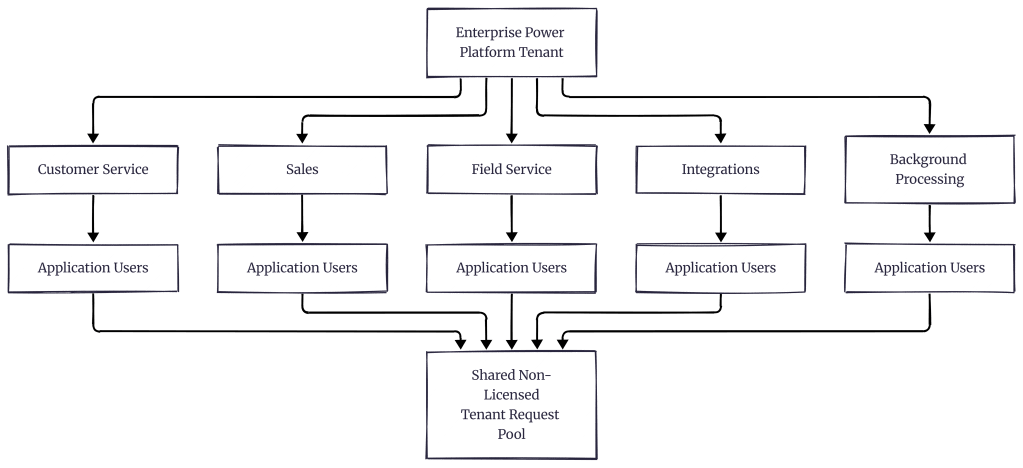
This is the view that becomes useful for BAU governance.
Not:
“Is Flow X okay?”
But:
“What is the total automation estate doing?”
Can We Monitor This?
Microsoft provides Power Platform Request usage reporting through the Power Platform admin center.
The reporting model includes downloadable reports for areas such as:
- Licensed users
- Non-licensed users
- Per-flow licensed flows
For non-licensed usage, the report can provide useful information such as environment, caller, caller type, resource and consumed quantity.
But there is an important limitation to understand when using the current preview reporting.
Microsoft’s documentation states that the reports currently include Power Automate API requests only and don’t yet represent requests originating from every Power Platform service such as Dataverse, Power Apps and Copilot Studio.
So reporting is useful for understanding consumption patterns.
It shouldn’t automatically be interpreted as a complete picture of every operation occurring across your tenant.
The Model I Keep in My Head
If all of this still feels complicated, I reduce it to three allocation paths.
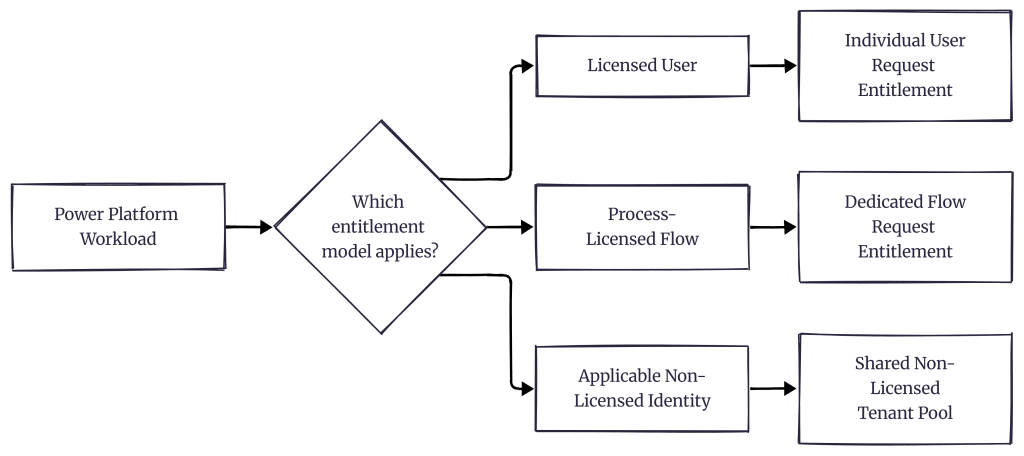
That’s the distinction worth remembering.
Licensed user
→ Individual entitlement
Process-licensed flow
→ Dedicated flow entitlement
Applicable non-licensed identity
→ Shared tenant-level allocation
Everything else becomes easier once we establish which path the workload is following.
But We Still Haven’t Solved the Most Interesting Problem
Let’s make one small change to our architecture.
We have hundreds of automated cloud flows.
They’re owned by application users or service principals.
But the organisation has historically configured their Dataverse connection references using one shared account:
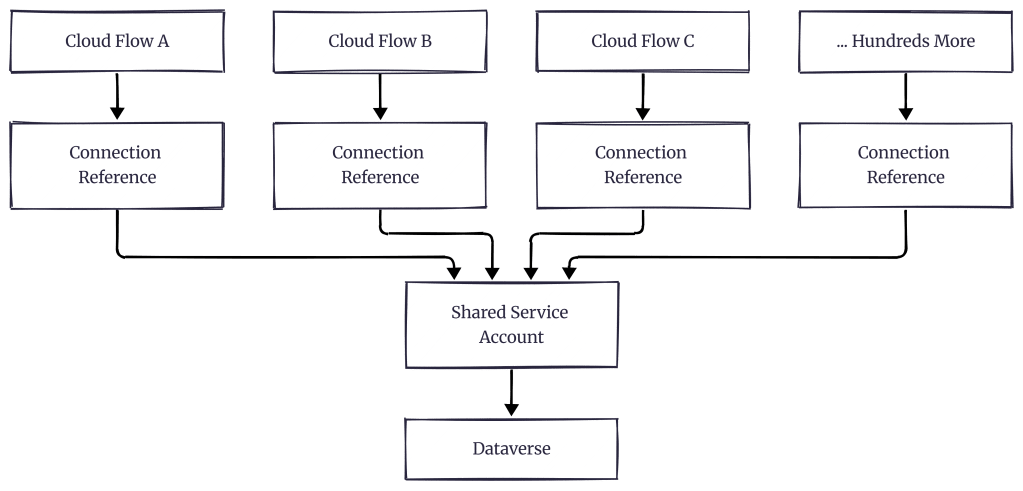
Now things become much more interesting.
The flow owner can influence the Power Platform Request entitlement context.
But the connection identity is the identity actually authenticating to Dataverse.
Those are not necessarily the same identity.
So what happens when hundreds of flows funnel their Dataverse traffic through one service account?
Does the service account consume the Power Platform Request entitlement?
Does the application user?
Which identity does Dataverse see?
And could the shared account become a bottleneck even when the organisation still has plenty of daily request entitlement available?
That’s exactly where we’re going next.

