

In the previous article, we looked at what actually counts as a Power Platform Request.
That naturally leads to the next question:
How many requests do I actually get?
This is where things start getting interesting.
You might have heard numbers such as:
6,000.
40,000.
250,000.
500,000.
And depending on the conversation, every one of those numbers might be correct.
The problem is that we often discuss these numbers without explaining who the allocation belongs to.
Is it allocated to the user?
The flow?
The application user?
The tenant?
Or the environment?
Understanding that distinction is far more useful than memorising the numbers themselves.
Start With the 24-Hour Allocation
Microsoft defines Power Platform Request limits over a 24-hour period.
For licensed users, the entitlement depends on the licence assigned to that user.
At the time of writing, Microsoft’s documented allocations include:
| Licence / workload | Official Power Platform Requests per 24 hours |
|---|---|
| Power Automate Premium | 40,000 per user |
| Power Apps Premium | 40,000 per user |
| Dynamics 365 Enterprise applications | 40,000 per user |
| Dynamics 365 Professional | 40,000 per user |
| Microsoft 365 / Office 365 seeded Power Platform rights | 6,000 per user |
| Dynamics 365 Team Member | 6,000 per user |
| Power Automate Process | 250,000 per licence |
| Power Automate Per-flow plan – legacy | 250,000 per licence |
Microsoft also documents 6,000 requests for Power Apps per-app and Power Apps pay-as-you-go users.
Immediately we can see why saying:
“The Power Platform limit is 40,000 requests.”
isn’t particularly useful.
40,000 for whom?
That is the question that matters.
40,000 Requests Doesn’t Mean Your Tenant Has One Big 40,000 × Users Bucket
Suppose an organisation has two users.
Both have Power Automate Premium.
Each receives an official allocation of 40,000 Power Platform Requests per 24 hours.
It can be tempting to think:
2 × 40,000 = 80,000 requests available to everyone.
But that’s not how Microsoft describes the Power Automate entitlement.
The capacity is tracked against the individual user.
If User A consumes 50,000 requests while User B consumes only 10,000, User A doesn’t simply borrow the unused 30,000 requests from User B.
Microsoft specifically states that this capacity is tracked at the individual user or flow level and can’t be pooled at another level such as the environment or tenant.
So conceptually:
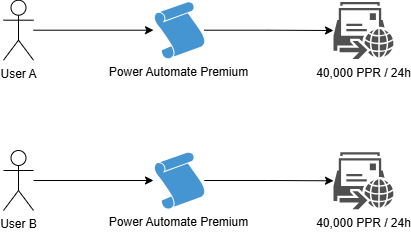
They may belong to the same Microsoft Entra tenant.
They may work in the same Power Platform environment.
They may even work on the same application.
But their normal user request entitlements are still tracked individually.
That distinction becomes extremely important when we start discussing flow ownership.
So Which User’s 40,000 Requests Does a Flow Use?
Consider an automated cloud flow: Who supplies the request entitlement?
The person who updated the Case?
The account configured in the Dataverse connection?
Or the flow owner?
For automated and scheduled flows running in the background, Microsoft states that the limits of the process owner are used, irrespective of what caused the process to start or which accounts are being used by the connections inside it.
Instant flows work differently. Because they’re invoked on demand, Microsoft states that they use the limits of the account that started the process.
That gives us an important distinction:
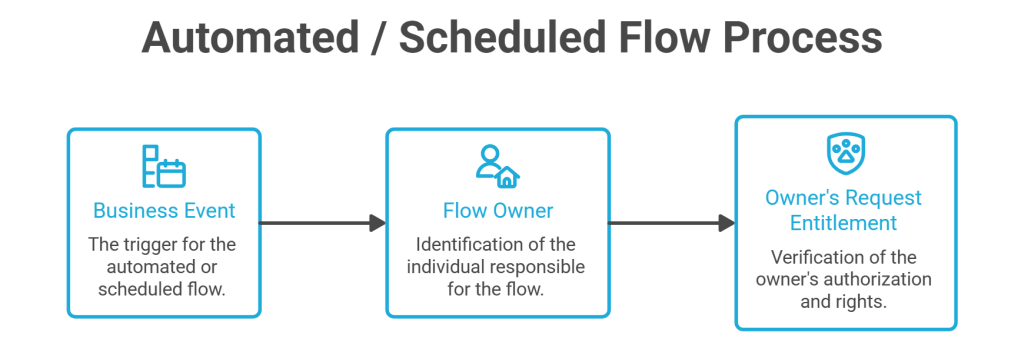
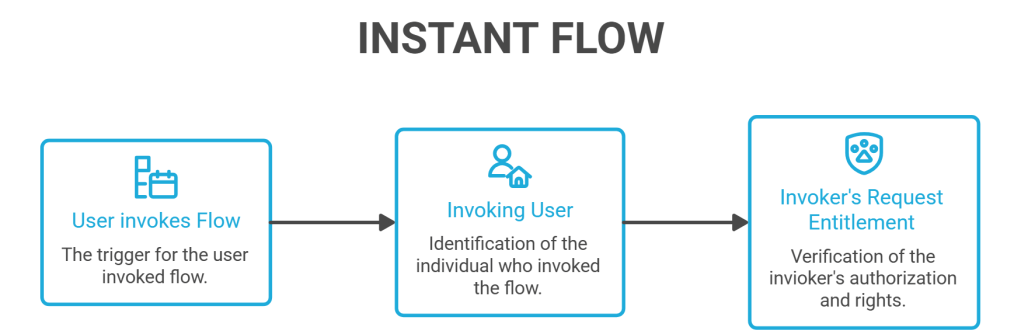
This is why flow ownership is not merely an administrative detail.
At scale, ownership can influence where request consumption is attributed.
What If the Flow Is a Business Process Rather Than a User’s Automation?
Now imagine a different workload.
You have an order-processing flow.
Thousands of employees might indirectly cause it to run.
It isn’t really “John’s flow” or “Sarah’s flow.”
It’s a business process.
This is where the Power Automate Process licence becomes relevant.
Microsoft documents an official entitlement of:
250,000 Power Platform Requests per Process licence per 24 hours.
Unlike a Premium user licence, the capacity is associated with the licensed flow rather than relying on the individual users interacting with it.
This can be much more appropriate for shared enterprise automation.
Microsoft also currently allows multiple Process licences to be stacked on a single solution-aware cloud flow. Each additional licence adds another 250,000 requests per 24 hours to that flow’s entitlement.
For example:
1 Process Licence =250,000 requests2 Process Licences =500,000 requests3 Process Licences =750,000 requests
This isn’t necessarily saying that every large flow needs Process licensing.
The important point is that user-based capacity and process-based capacity are different architectural models.
Then Where Does the Tenant-Level Pool Come In?
This is where Power Platform Request allocations become more nuanced.
Dataverse supports identities that don’t represent normal interactive licensed users.
Microsoft specifically identifies:
- Application users
- Non-interactive users
- Administrative users
- SYSTEM
For these identities, Microsoft provides a separate non-licensed tenant-level request pool.
And this pool behaves differently from the individual user allocations we discussed earlier.
For tenants with qualifying Dynamics 365 Enterprise or Professional applications, Microsoft documents:
500,000 base requests
plus
5,000 requests for each qualifying paid user licence
up to a documented maximum of 10,000,000 requests per 24 hours.
For Power Apps-only and Power Automate-only scenarios, Microsoft documents a 25,000 base tenant-level request allocation, with no per-licence accrual.
Let’s Put Some Numbers Around It
Imagine an organisation has:
200 qualifying Dynamics 365 Enterprise users.
Its non-licensed tenant pool would conceptually be:
Base allocation500,000+200 users × 5,0001,000,000=1,500,000 requests / 24 hours
That capacity is available to the applicable non-licensed identities operating within the tenant.
This is fundamentally different from saying:
“Every Dynamics user contributes their 40,000 requests into one big pool.”
They don’t.
The licensed user’s request entitlement and the non-licensed tenant-level pool are different allocation mechanisms.
That distinction is easy to miss.
Do Application Users Each Get Their Own Pool?
No.
This is another particularly important detail for enterprise implementations.
Suppose you have:
- Application User A
- Application User B
- Application User C
- Integration Application User
- Background Processing User
They don’t each receive their own separate tenant-level allocation.
Microsoft states that the tenant-level limit is shared across application users, non-interactive users, administrative users and the SYSTEM user within the tenant.
So the architecture looks more like:
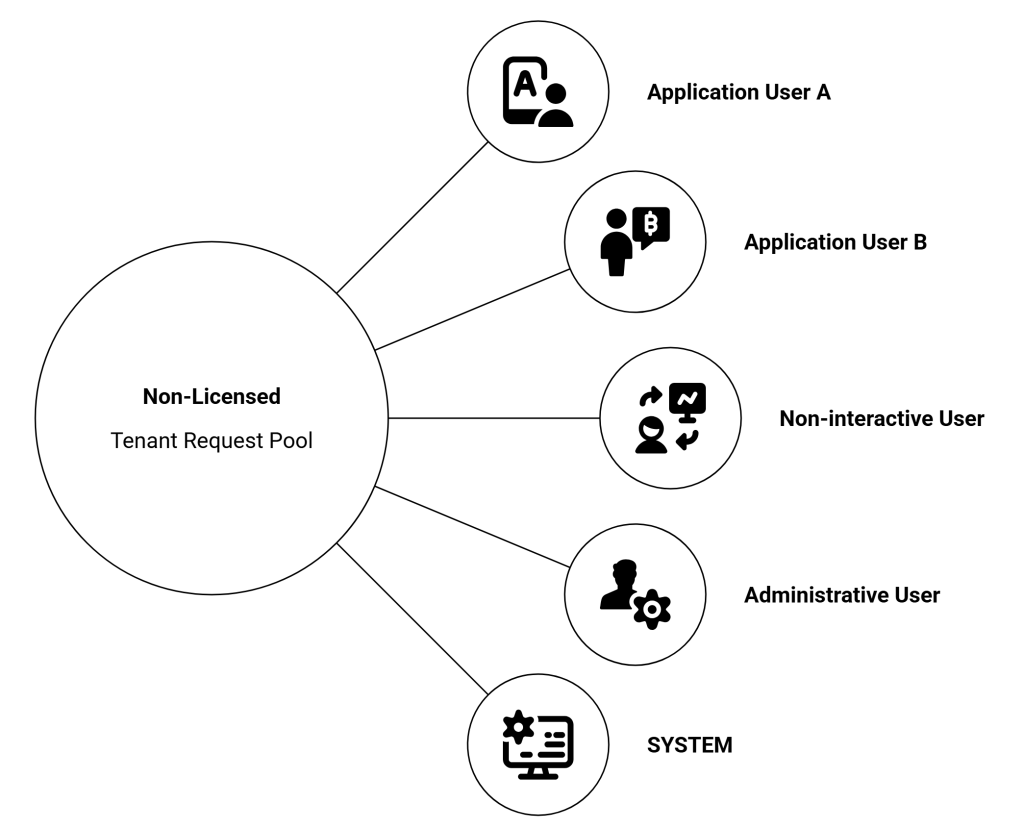
This is where enterprise planning becomes important.
Adding another application user may improve security boundaries, ownership and workload separation.
But it doesn’t magically create another independent non-licensed request pool.
What If My Tenant Has Dynamics 365 AND Power Apps?
Another subtle detail.
Suppose the tenant contains both:
- Dynamics 365 Customer Service Enterprise licences
- Power Apps Premium licences
Dynamics 365 provides the larger non-licensed tenant-level allocation.
Power Apps provides its own 25,000 base allocation.
Do we simply add everything together?
Microsoft says no.
Where a tenant has multiple subscription types, the non-licensed request capacity uses the product-line subscription providing the larger number of requests.
Microsoft’s own example describes a tenant containing Dynamics 365 Customer Service Enterprise and Power Apps per-user subscriptions. The applicable non-licensed tenant capacity is the Dynamics allocation of 500,000 base plus the qualifying accrued capacity, rather than adding the separate 25,000 Power Apps pool on top.
That’s another reason I wouldn’t describe Power Platform Request capacity simply as “tenant pooling.”
Some capacity is user-based.
Some is flow-based.
Some is tenant-level.
And the rules are different for each.
What About Users With Multiple Licences?
There is another interesting scenario.
Suppose a user has:
Dynamics 365 Customer Service Enterprise + Power Apps Premium
Microsoft’s official allocation model states that multiple paid licences can add together.
So, outside the current transition-period enforcement behaviour:
40,000 + 40,000 = 80,000 requests / 24 hours
There is an important current caveat, though.
Microsoft says all organisations are currently in a transition period, during which higher transition limits apply. During that transition period, user licence stacking isn’t supported for Power Automate enforcement; where a user has multiple plans, the flow uses the higher plan.
That distinction between the official entitlement model and the current transition enforcement model is important when interpreting what you see in a live environment.
The Transition Period Can Make Testing Misleading
This deserves special attention.
Microsoft currently documents higher transition-period Power Automate limits than the official allocations.
For example:
| Licence | Official limit | Current transition profile |
|---|---|---|
| Power Automate Premium | 40,000/user | 200,000/cloud flow |
| Power Apps Premium | 40,000/user | 200,000/cloud flow |
| Dynamics 365 Enterprise | 40,000/user | 200,000/cloud flow |
| Office 365 | 6,000/user | 10,000/cloud flow |
| Power Automate Process | 250,000/licence | 500,000/licence |
Microsoft explicitly recommends designing cloud flows against the official limits, rather than assuming the more generous transition-period limits will remain.
That’s particularly important when building solutions expected to operate for several years.
Something working today doesn’t automatically prove that the architecture fits the documented long-term entitlement.
What Happens to Unused Requests?
Nothing.
Power Platform Requests don’t accumulate like annual leave.
If a user has an allocation and doesn’t consume it during the applicable 24-hour window, those requests don’t roll into tomorrow.
Microsoft describes the Power Automate 24-hour measurement as a sliding window.
Whenever a cloud flow executes, the service looks back across the preceding 24 hours when evaluating consumption.
So don’t think:
Monday: 10,000 usedTuesday: 10,000 usedUnused Monday capacity ↓Available Tuesday
It doesn’t work that way.
What If I Need More?
Microsoft provides several mechanisms depending on the scenario.
A Power Platform Requests capacity add-on adds 50,000 requests per 24 hours, and multiple add-ons can increase the available limit further. However, Microsoft currently states that these add-ons can’t be assigned to users or flows during the transition period.
For a cloud flow that needs its own entitlement, Microsoft currently points to the Process licence, which gives the flow 250,000 requests per 24 hours.
This distinction matters.
Before purchasing capacity, first identify which allocation is actually being exhausted.
More Request Capacity Does Not Mean More Instantaneous Throughput
And this is probably the most important point to carry into the next few articles.
Imagine your Process-licensed flow has:
250,000 Power Platform Requests per 24 hours.
That doesn’t mean the flow can suddenly fire all 250,000 requests at Dataverse simultaneously.
Microsoft explicitly documents other service-specific protection mechanisms in addition to the daily Power Platform Request entitlement.
That includes:
- Power Automate limits
- Dataverse Service Protection limits
- Connector limits
Microsoft even gives a useful example: a Process-licensed flow may have a 250,000-request daily entitlement, while still being subject to Power Automate’s separate five-minute limit.
So:
REQUEST ALLOCATION"How much am I entitled to consume?" ≠SERVICE PROTECTION"How quickly can the service safely process it?"
This distinction explains one of the most common mistakes in Power Platform troubleshooting.
A solution can have plenty of daily request entitlement…
…and still be throttled.
And buying more daily capacity doesn’t automatically solve that problem.
Putting the Allocation Model Together
The simplest way I think about Power Platform Request allocation is this:
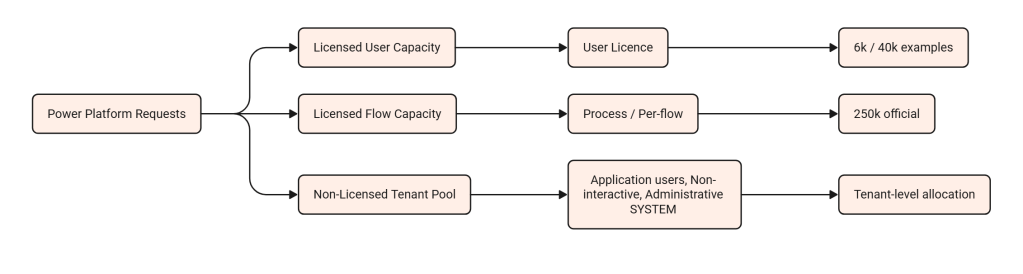
That model is far more useful than remembering:
“Power Platform gives me 40,000 requests.”
Because the real question isn’t just:
How many requests do I have?
It’s:
Whose allocation is this workload actually consuming?
Once you can answer that, Power Platform Request licensing becomes much easier to reason about.
And it sets us up for the next question.
If application users and other non-licensed identities share capacity at tenant level…
how exactly does that tenant pool behave when you have hundreds of integrations, flows and application users competing for it?
That’s where we’ll go next.


One thought on “Power Platform Request Allocations – Who Gets What?”