

Why a simple Power Automate flow can quietly consume thousands of Power Platform Requests?
The Biggest Misconception
One of the biggest misunderstandings in Power Platform is believing that:
One Flow = One Request
Unfortunately… That’s almost never true.
A single business action can trigger dozens or even hundreds of Power Platform requests, depending on how the automation is designed.
That’s why understanding request consumption matters more than simply knowing your request allocation.
The Coffee Shop Analogy
Let’s map it.
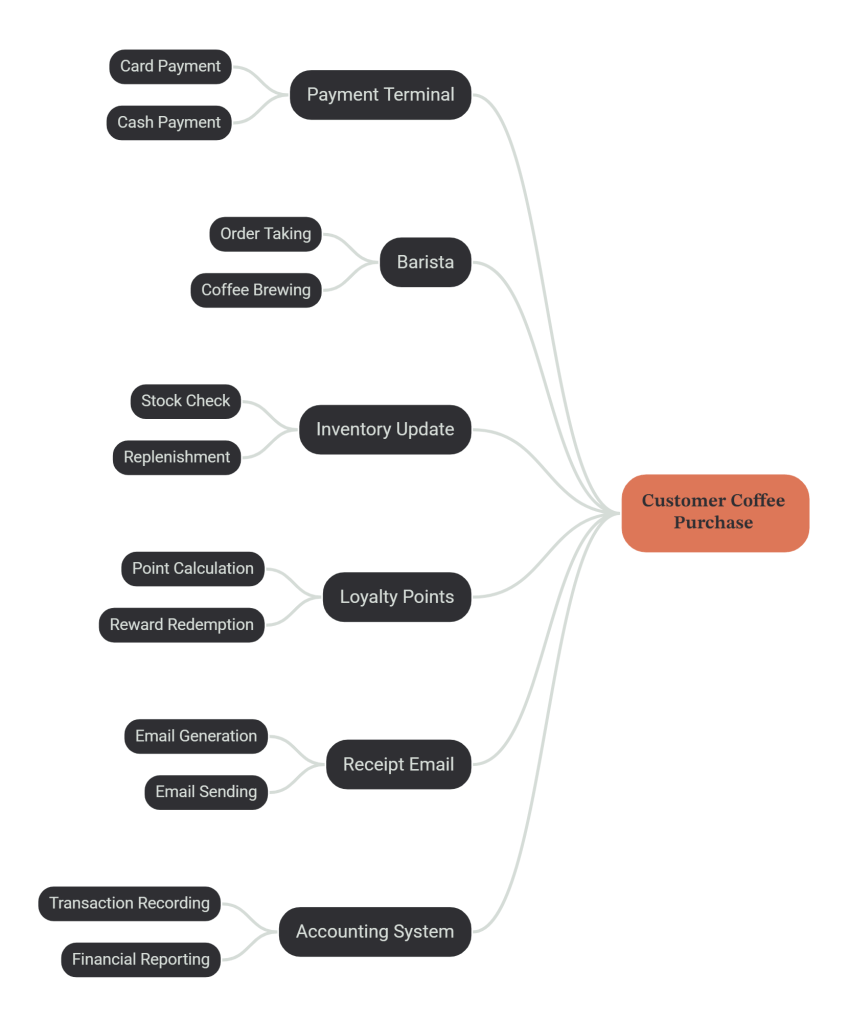
One purchase. Many operations.
Exactly like a cloud flow.
The Power Platform Version
Now imagine a customer updates a Case in Dynamics 365.
One business action. Behind the scenes, the flow might:
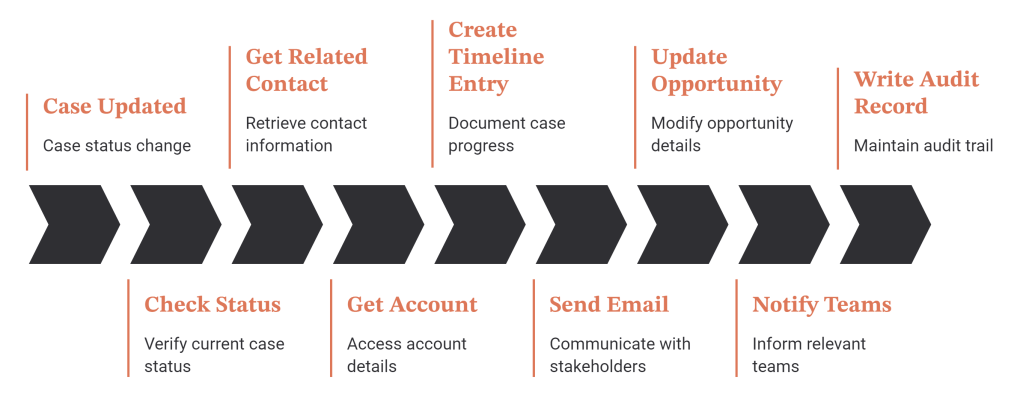
To the user… They clicked Save.
To Power Platform… Multiple actions have been executed.
The Invisible Cost
This is where many enterprise solutions slowly become expensive—not financially, but operationally.
A project launches with:
- 15 flows
- Small data volumes
- Few integrations
Everything feels fast.
Three years later:
- Hundreds of flows
- More business rules
- More integrations
- Larger datasets
- More retries
- More notifications
The business process hasn’t changed. The automation behind it has.
The Domino Effect
Imagine standing the first domino.
It falls.
Now twenty more fall.
That’s exactly what happens when a single event triggers multiple automations.
One Case update might lead to:
- Parent flow
- Child flow
- Dataverse update
- Teams notification
- External API
- Audit log
- Approval process
Each additional action adds to the workload. The challenge isn’t usually one flow.
It’s the combined effect of hundreds of small automations running together.
Why Small Decisions Matter
Many optimisations seem insignificant.
Do you really need another “Get Row” action?
Can one query replace three?
Can filtering happen earlier?
Can unnecessary flow runs be avoided?
Each decision might save only a few requests.
Across thousands of executions every day, those small savings become significant.
Good design isn’t about making one flow faster.
It’s about making the entire platform more efficient.
A Better Question
Instead of asking:
“How many requests does my environment have?”
Start asking:
“How many requests does this business event actually generate?”
That shift in thinking changes how you design automation from the very beginning.
Real-World Example
A support team resolves one Case.
What they see:
✔ Case closed.
What Power Platform might do behind the scenes:
- Update Dataverse
- Retrieve related records
- Trigger multiple flows
- Send customer email
- Notify Microsoft Teams
- Update reporting tables
- Write audit information
- Synchronise with another system
One click. Many operations.
Understanding that difference is the first step towards building automation that scales.
Key Takeaways
✅ One business action rarely equals one request.
✅ Small design decisions compound over time.
✅ Focus on the cost of a business event, not just the cost of an individual flow.

